I moved a candidate spreadsheet into an ATS. Four fields survived
Most small teams do not start with an applicant tracking system. They start with a spreadsheet, and they keep using it until the spreadsheet stops being able to answer “where is this person in the process?” That is usually the moment the ATS shopping starts.
So the first thing I did with Breezy HR (affiliate link) was not evaluate its features. It was to take a candidate spreadsheet and try to move it in. On 11 August 2026 I ran that import several times, deliberately, with different column layouts. Here is what arrived on the other side, and what you should fix in your spreadsheet before you attempt the same thing.
Your header row will become a candidate
I imported a CSV containing three people. Breezy told me it had imported four candidates.
The fourth was named first name.
Breezy read my header row as data. It did not warn me, did not flag the row, and did not treat it as an error — the import was reported as a success. The only way to notice is to look at the candidate list afterwards and recognise that one of the names is a column label.
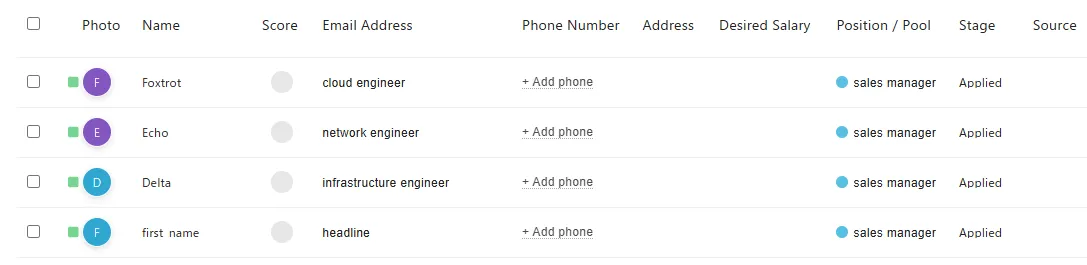
This is not an edge case. It happened on every import I ran. If you move 100 people across, you will have 101 candidates, and the extra one is fictional. Worse, once that phantom record exists it is matched as a duplicate on every subsequent import, so it gets skipped politely and permanently — the junk settles in and then hides inside behaviour that looks correct.
What actually crosses over
Breezy accepts a CSV in whatever shape you already have, then shows you a screen where you map your columns to its fields. That flexibility is genuinely good, and I will come back to it.
The problem is the list of fields you are allowed to map to. There are four:
- Name
- Email Address
- Summary
- Phone Number
That is the entire menu. Every other column in your spreadsheet gets one option:
Remove.
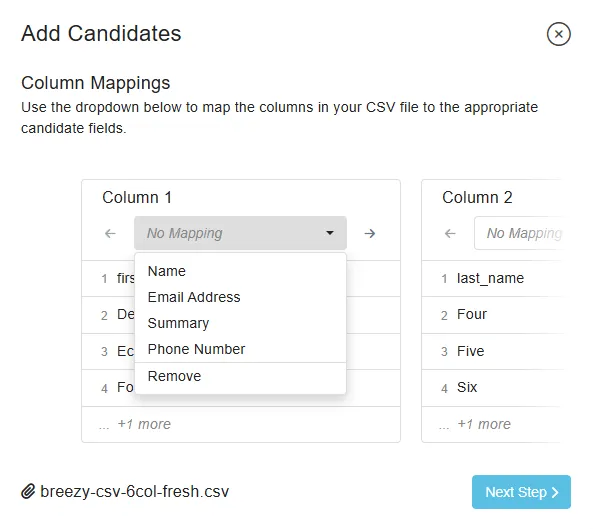
Think about what is actually in a real candidate sheet. Source — where the person came from. Current employer. Location. The role they applied for. Skills. The date you spoke to them. Your own notes about the conversation. None of that has anywhere to go. You either lose it or you re-enter it by hand, one candidate at a time, which defeats the point of a bulk import.
What makes this harder to accept is that Breezy’s own candidate records are not thin. The candidate list can display Address, Desired Salary, Preferred Locations, tags, source, referrer, AI Score, Resume Audit status. The fields exist. The product is not simply a minimal tool that only tracks four things.
So I built a field for it, and it still did not appear
Breezy lets you define your own candidate fields — Settings → Custom Fields, up to fifty of them. That looked like the answer.
My test file has a location column, so I created a candidate custom field, named it
Location, left it as Text, and saved it. Then I started the import again and opened the
same dropdown.
Name. Email Address. Summary. Phone Number. Remove.
I reloaded the browser and did it a second time, in case the list had been cached from before I created the field. The same five options. A field I had built myself, named identically to the column sitting right next to it, is not somewhere the importer will put anything.
It is not only custom fields. Breezy has a settings screen called Data Manager that maintains two taxonomies for candidates — Tags and Sources, up to 250 of each. Both are ordinary parts of a candidate record, maintained by Breezy, in Breezy. Neither is offered on the mapping screen either. Source is the first thing most recruiting spreadsheets track and the last thing you can bring with you.
And then there is Breezy’s own API. In the documentation Breezy publishes, the endpoint that creates a candidate accepts work history, education, tags, source, social profiles and custom attributes. Separate endpoints exist to append employment and education records to a candidate afterwards.
That door has a lock on it. API Access is not listed on any of the four plans Breezy prices publicly. It appears once, in the description of the Custom Pro Plan — the unpriced tier whose button says Request Info — as one of the advanced features you can ask to have added, alongside advanced reporting, SSL on custom domains and data export/import. My trial account is told it has “access to all the features,” and it has no screen anywhere that issues an API key.
So the four-field ceiling is not a limit on what Breezy can hold, and it is not a limit on what Breezy can be given. It is a limit on one screen. The container is wide, the programmatic door is wide and priced above the published plans, and the door that the small companies Breezy is sold to will actually walk through — the one marked “I have a spreadsheet” — is four fields wide.
Breezy cannot read its own export
There is a test that settles this, and Breezy supplies both halves of it.
Select your candidates, open the More menu, choose Export Candidates, and you get a CSV.
How wide that CSV is depends on a setting most people will never open. The candidate list has a Columns button, and the export writes whatever that button has ticked. On the default settings I got fifteen columns. With every box ticked I got twenty-nine:
name, ai-score, ai-score-audit, score, email, phone, address,
desired_salary, headline, resume, tags, reqId, position, location, stage,
email_verification, assigned_to, referred_by, referrer_email, source,
sourced_by, addedDate, addedTime, lastActivityDate, lastActivityTime,
dispositionDate, dispositionReason, star, Location
Then take that file — Breezy’s own output, in Breezy’s own format, as wide as Breezy will make it — and feed it back into Breezy’s import screen.
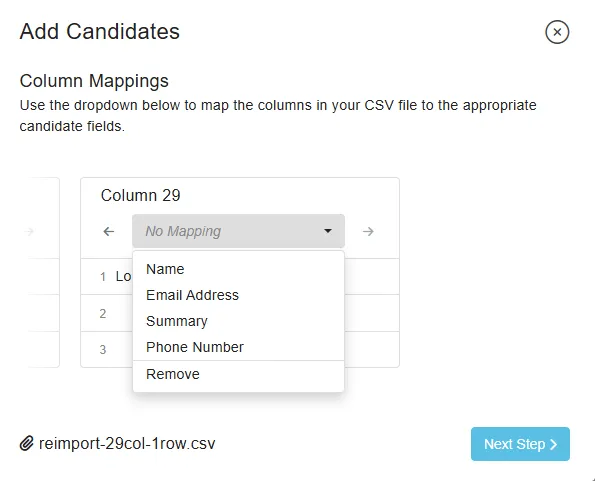
Twenty-nine columns arrive as Column 1 through Column 29. I stepped to the last one and opened the dropdown. It offers Name, Email Address, Summary, Phone Number, Remove — the same five as Column 1, and the same five I got when the file was fifteen columns wide. Doubling the width of the export changes nothing about what the importer will take.
Three of the twenty-nine have somewhere to go: name, email, phone. Two more, position and stage, are set once for the whole batch in the import wizard rather than read from the file — so the fact that my export has some people in Applied and others in Feedback does not survive; everyone lands on whichever stage I pick. The remaining twenty-four — the AI score, the resume link, tags, location, address, desired salary, source, who sourced them, when they were added, when they were last active, whether they are starred — have nowhere to go at all.
And note which field is missing from the export: Summary. The one free-text field the
importer offers, the one I recommend below as the place to fold everything you cannot map,
is not among the columns Breezy gives you back — not in the fifteen, not in the
twenty-nine.
I checked whether it might be hiding under another name. The export has a headline
column, so I mapped that to Summary and ran the import. The candidate came back with an
empty headline, so they are not the same field — but the text had to have gone somewhere,
and it took me a second session to find out where. It is on the Experience tab, in a box
labelled Summary, sitting there perfectly intact.
So the import worked exactly as advertised. That is what makes the shape of this clear:
Summarycan be filled by an import and can never be exported. It is a one-way door. Anything you fold into it during a migration is inside Breezy for good — readable on screen, absent from every CSV the product will produce.headlineis the same door facing the other way. Breezy writes it out and cannot read it back; nothing in the importer sets it. It gets filled by the résumé parser, or by Breezy itself — one candidate of mine has the headline “Added by teruaki kunii,” which is not a headline, and which I did not write.
Which means the standard advice for this situation — put everything you cannot map into the Summary field — is advice to write your data into the one field that will not come back out. I am still going to give you that advice below, because the alternative is losing the information at the door. But keep the original spreadsheet.
Export your candidates from Breezy and import them into Breezy, and three of twenty-nine columns survive. That is not a migration inconvenience. It means the product cannot round-trip its own records through its own front door — and if that is what happens to data Breezy formatted itself, a spreadsheet you built by hand was never going to fare better.
How that compares with Manatal, BambooHR and Recruit CRM is in a side-by-side of what four ATSs let you take out.
The name field is one box
Name is a single field. Not first name and last name — one box.
If your spreadsheet keeps given name and family name in separate columns, which is an
extremely common layout, only one of them makes it in. In my test the surnames simply
vanished. Delta Four, Echo Five and Foxtrot Six arrived as Delta, Echo and Foxtrot,
with nothing after them.
There is no option on the mapping screen to combine two columns. You have to concatenate them into a single column in your spreadsheet before you upload. That is a one-minute fix if you know about it in advance, and a re-import if you don’t.
Nothing checks whether an email is an email
Breezy does not try to guess your columns. Even when a column is named something as
unambiguous as first_name, every dropdown starts on No Mapping and you select all of
them by hand. Your columns are also identified by position — “Column 1”, “Column 2” — and
once you have set some of them to Remove, keeping track of which position is which gets
genuinely fiddly.
I ran the import three times across a six-column file. All three times I got the mapping wrong. Once I left email unset. Once I mapped the surname column into Email Address. Once I mapped an empty phone column into it.
Here is the part that matters: Breezy accepted all of it. When surnames went into the
email field, it created candidates whose email addresses were applicant, person,
candidate and last_name. No warning. No error. Reported as a successful import.
There is no format validation on the email field at all, which means the two failures compound. The screen makes a mis-mapping easy, and then nothing downstream catches it. The realistic version of this is not a tidy test file — it is someone shifting their columns by one, not noticing, and finding out weeks later when a bulk message to forty candidates silently goes nowhere.
Then it happened to me a fourth time, and I am including it because of when it happened.
I re-ran the import specifically to capture the screenshots for this article. I knew what
the failure looked like. I had written the warning above. On a six-column file I wrote
myself, I mapped the headline column into Email Address, and Breezy imported three
candidates whose email addresses are cloud engineer, network engineer and
infrastructure engineer:
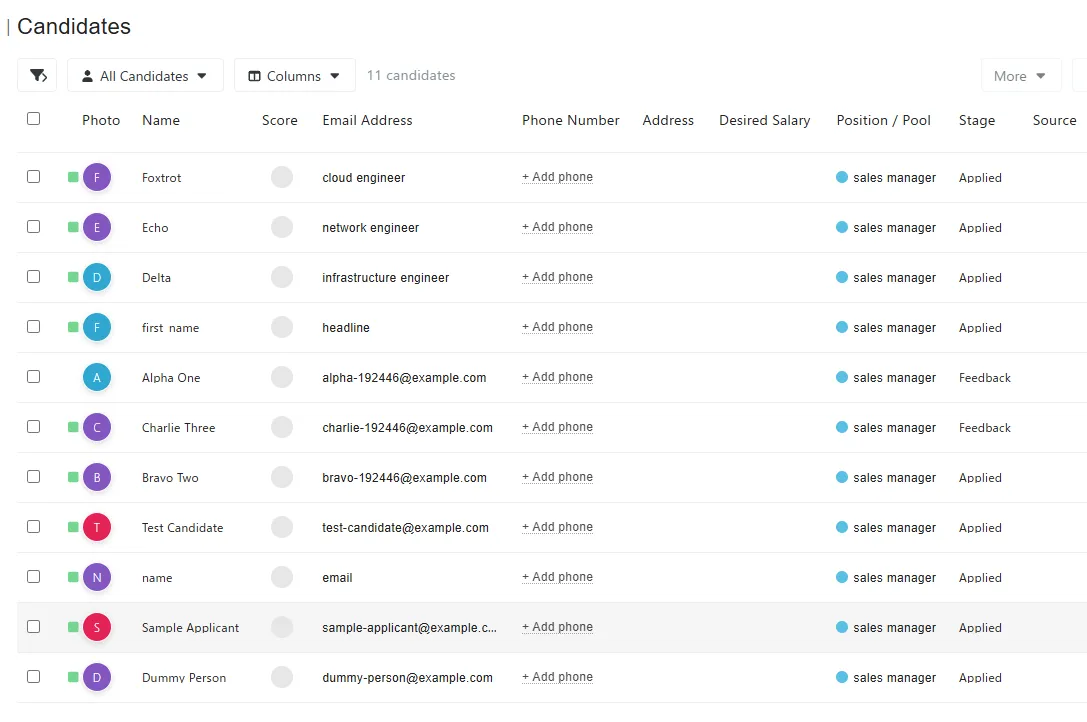
Four attempts, four mis-mappings, the last one made while actively documenting the problem. I no longer think this is carelessness on my part. When the columns are labelled only by position, nothing is detected automatically, and nothing is validated afterwards, getting it right is a matter of luck rather than attention.
The same screenshot shows the other two problems in one frame, incidentally: the surnames
are gone, and the header row has become a candidate called first name whose email
address is headline.
What it gets right
I want to be precise about this, because the import screen is not bad work throughout. Several things are done properly:
- It accepts your file as it is. No mandatory template, no prescribed column order. You do not have to reshape your spreadsheet to match Breezy’s idea of one.
- Duplicate detection works. It matches on email address. When I imported the same file a second time, every row was skipped with a clear reason: “Duplicate — candidate already exists.”
- It refuses to run without a name column. If you try to proceed without mapping one, it stops you. It does not quietly create a batch of blank records.
- It reports skipped rows individually, with reasons. You get a per-row account of what did not go in and why.
- You choose the destination and the stage. You pick which job or talent pool the candidates land in, and which pipeline stage they start at — Applied, Feedback, Interviewing, Made Offer, Disqualified or Hired.
That last one deserves emphasis, because it is the thoughtful feature in the set: your candidates do not all have to reset to the top of the pipeline.
It comes with a limit worth knowing before you plan the move, though. The stage is chosen once, for the whole batch — it is not read from a column, so it cannot differ per person. If your candidates are spread across four stages, that is four separate files and four separate imports, and you should split them before you start rather than discover it halfway through.
So the honest summary of migrating into Breezy is split, not damning: your progress can be preserved if you plan for it, and your candidate detail cannot be.
The mistake I nearly published
Partway through this testing I thought I had found something much worse.
The import summary appeared to be inverted — telling me rows had been imported when they had been skipped, and vice versa. That is a serious claim about a tool people rely on, and I had it written down as a finding.
Before writing it up, I reset the conditions: a clean CSV, with email addresses that had never been used in the account. Imported once. It reported three imported, one skipped — which matched the candidate list exactly, with the skip reason spelled out per row.
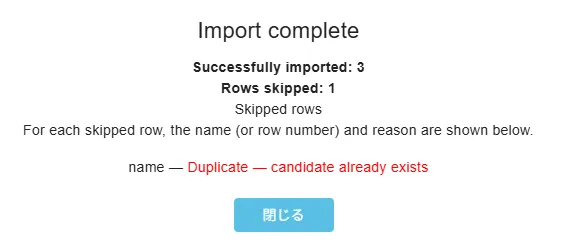
It did not reproduce. What I had actually been looking at was the residue of repeatedly deleting and re-importing the same people, with duplicate matching behaving correctly against records I had forgotten were still there. The reporting was accurate the whole time. It is, in fact, the highest-quality part of the import flow.
Had I published without checking, the article would have been wrong. I am including this because the standard I want to hold on this site is that the heavier the accusation, the more it needs a reset-and-reproduce before it goes out. Everything else on this page went through that step.
Prepare your spreadsheet like this
If you are moving a candidate sheet into Breezy this week, do these before you upload:
- Merge first and last name into one column. Name is a single field; the second column is lost otherwise.
- Fold what you care about into Summary. It is the only free-text field available, so collapse source, current role, location and your notes into one line per person. It is ugly, and it beats losing them — but know that it lands on the Experience tab and no export will ever give it back, so this is a copy, not a move. Do not build custom fields for this first — I tried, and they are not offered as mapping targets. You would be doing the work twice.
- Split the file by pipeline stage. The stage applies to the whole import, so one file per stage is the only way to bring a part-worked pipeline across intact.
- Import a handful first, not the whole file. Five rows will show you whether your mapping landed correctly. Check the candidate list against the file before you run the rest.
- Delete the candidate created from your header row. It will be there. It will be named after one of your columns.
- Keep the original spreadsheet. Deletion in Breezy is permanent — I confirmed that deleted candidates do not come back under the archived filter. There is no undo, so your spreadsheet is your only backup. It is also the only copy of everything you folded into Summary, because that field does not come back out.
Do that and the import is fine. Skip it and you get a fictional candidate, missing surnames, and possibly a set of email addresses that are not email addresses.
Which tool handles this better?
The obvious question is whether this is normal for the category or specific to Breezy. A four-field ceiling is low enough that I suspect it is not universal.
I kept the exact CSV files used here, so the next step is to run the identical import into Manatal and JazzHR and compare the three under the same conditions — same file, same mistakes available, same checks. That comparison is coming.
One thing I can now add, having kept the account for another eleven days: the export side does not improve on a cheaper plan, and it does not get worse either. I downgraded to the free Bootstrap tier and exported all twenty-nine columns again, AI scores included. The ceiling described here is the product’s shape, not a paywall.
In the meantime, if you are considering Breezy specifically, there is a second thing worth knowing before you commit: its AI features report events that never happened — a problem I found considerably more serious than this one. My full hands-on review of Breezy, including what the free plan actually gives you, follows once I have finished testing it.
Manatal maps 24 fields where Breezy maps four. I put the same spreadsheet through both.
Disclosure: the Breezy HR link in this post pays me a commission if you sign up through it, and it is marked where it appears above. It costs you nothing extra, it did not change a word of what this post says, and I do not accept payment in exchange for favourable coverage. Every other link here is an ordinary one.