Review · Breezy HR
Breezy HR review: the AI writes things that never happened
By Teruaki K. · Published · Updated
What works
- The kanban pipeline works exactly like Trello or Notion — nobody on the team needs training
- CSV import catches duplicates, refuses to run without a name column, and reports what it skipped, row by row
- Rewriting a job description with AI took 10 seconds and fixed a real mismatch the template had
- The free Bootstrap plan keeps the whole interface and is not a disguised trial
- Breezy emails you a per-operation AI usage log, with credits and an initiator column — most vendors show you a balance and nothing else
What doesn't
- The AI activity summary states events that never happened — with dates — on a screen used to judge people
- AI-written job descriptions ship with unsubstituted {ADDRESS} placeholders that survive the preview
- CSV import carries only four fields, and turns your header row into a candidate every single time
- Free job distribution to Indeed and others is switched ON by default while you are still experimenting
- AI screening runs itself on upload, keeps running after you downgrade to the free plan, and spends credits without asking
- AI costs are shown only as credits, and the button that converts them to dollars is disabled until you register a card
- Task management — remembering what to do next — starts at $157/month billed annually, quoted as $189 in the upgrade prompt
What I actually did with it
I did not read the feature list and summarise it back to you. On 11 August 2026 I opened a Breezy HR trial and used it the way a small company would in its first week. I then kept the account for eleven days, ran its AI features on purpose, and on 22 August downgraded it to the free plan to see what the same screens looked like from the other side.
I built a Sales Manager role from scratch, all the way through Breezy’s setup: the role details, the job description, the pipeline, the scoring setup, and the advertising screen. I wrote the description using Breezy’s own AI rewriting tool. I imported a CSV of candidates, several times, with the columns arranged differently each time. I opened candidates, moved them between stages, and ran the AI features on them.
Two honest caveats: the candidates were test data, not real applicants, and the job was kept as a draft with external distribution switched off, so nothing was published to a job board. Everything below is what the product did between 11 and 22 August 2026 — first on the full-feature trial, then on the free plan.
You cannot sign up with a Gmail address
Breezy stops you at the door if you use free email. Enter a Gmail address in the Company Email field and you get “Please use a company email address.” You need email on a domain you own.
JazzHR’s form does not stop you there — and eight days after I filled it in, it had not stopped me anywhere else either, because no account was ever created.
For a product sold to small businesses, this is a strange filter to lead with. A two-person company hiring its third employee very often runs on Gmail — that is not a sign they are not a real business, it is a sign they have not bought a domain yet. They are exactly the customer Breezy’s free plan is designed for, and they cannot get past the signup form.
I only got through because I had registered a domain days earlier and set up forwarding on it. If you are in that position, sort the domain out first; the ATS evaluation cannot start until you do.
Getting one job posted
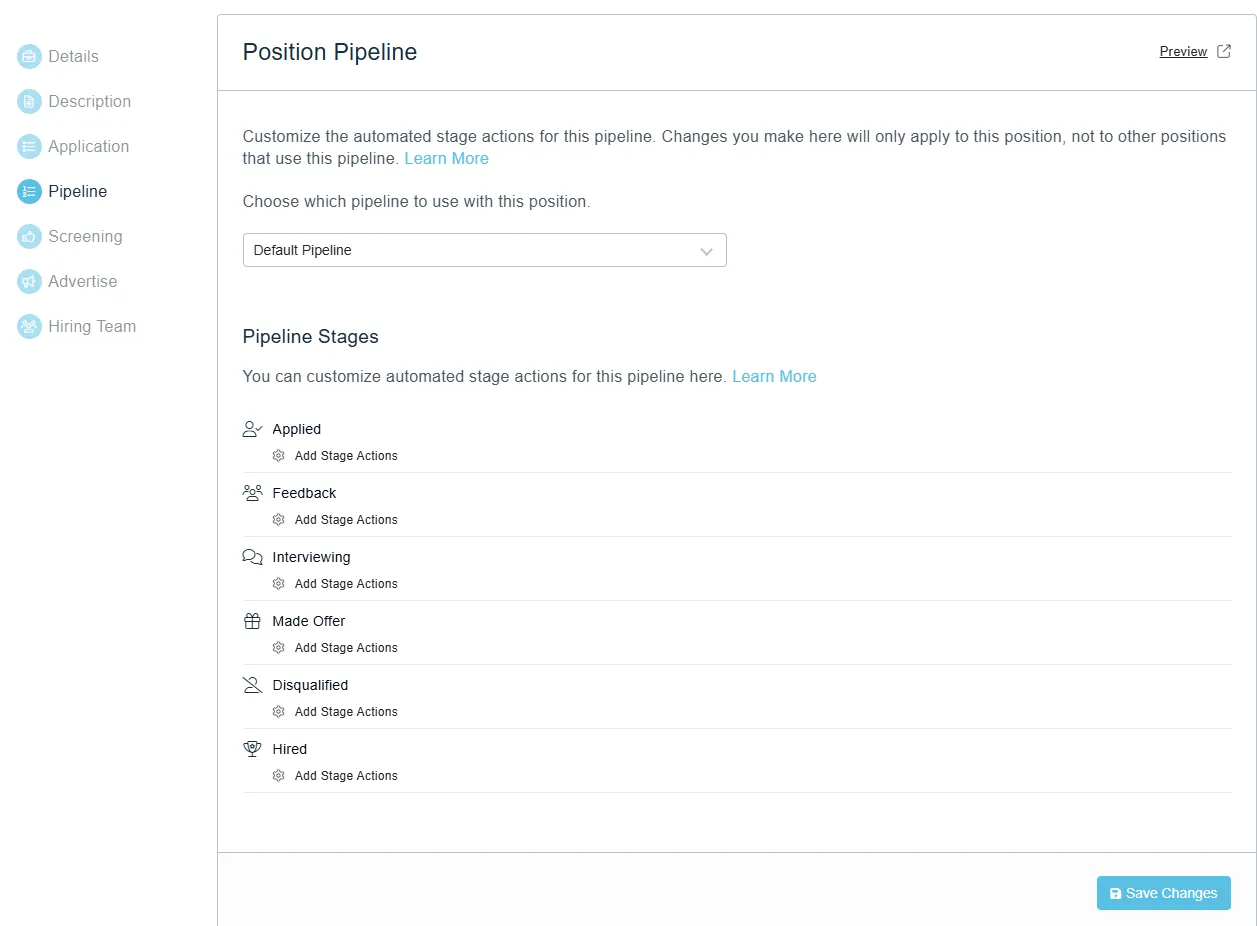
Creating a single job takes you through seven numbered steps: Details, Description, Application, Pipeline, Screening, Advertise, Hiring Team. You can save a draft at any point.
Two things are worth knowing before you start.
The location field does not save by itself. You type the location into the box, and it does not count. You have to press “Add Location” to commit it. If you fill the box and move on, you are blocked with “At least one location is required” — while the location is visibly sitting there in the field. A filled-in box that does not count as filled in is a design problem, not a language problem; anyone will lose a minute here.
Free job distribution is ON by default, and this one can actually cost you. On the Advertise step, Standard Advertising is already marked Enabled, with only a Disable button beside it. The panel tells you what that means: “Once approved, your position will appear on Indeed, Glassdoor, Google Jobs, WayUp, JobRapido, ZipRecruiter, and many more within 24 hours.”
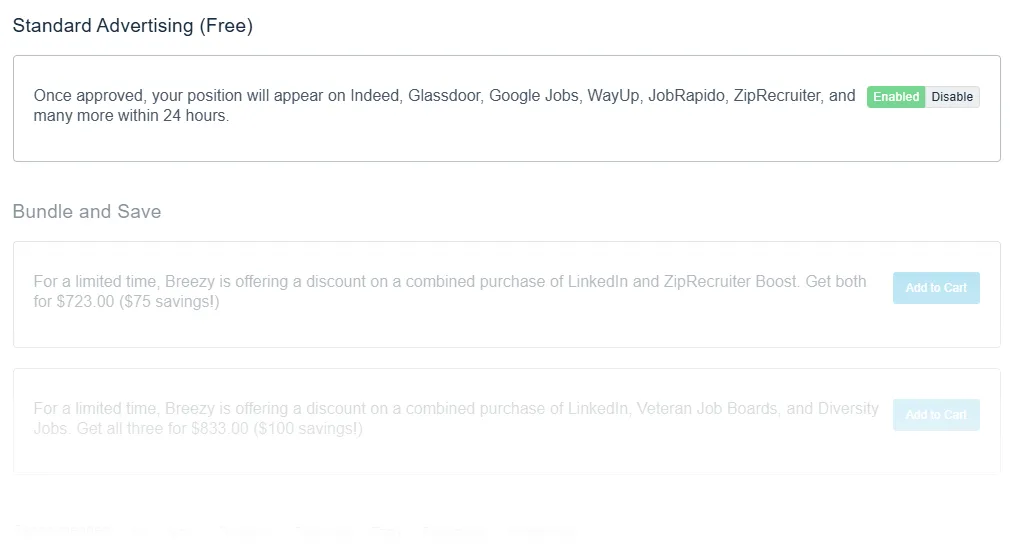
If you are evaluating Breezy with a made-up job — which is the sensible way to evaluate any ATS — that test posting goes out under your company name to half the job boards on the internet the moment you activate it. Switch it off on the Advertise step before you activate anything.
There is a second half to this that I only found later. On the free plan the same channel needs a company verification that no plan page mentions, and after mine came through the screen stopped giving a reason at all — while the switch still reads Enabled. What the Advertise tab says now.
Of the seven steps, three are not really for a small company on day one. Screening is where scorecards live and those are a paid feature. Advertise costs money. Hiring Team does nothing if you are the hiring team. Four steps are the job; the other three are a guided tour of things to buy later.
The Screening section also holds two AI toggles. Applicant Insight offers “AI-based scoring to evaluate candidates against your criteria.” Resume Audit will “check resumes for originality, to help prioritize authentic candidates.” Both default to off, which is the right default.
I left them off for this review. Automated candidate scoring carries regulatory obligations in some US jurisdictions, and that deserves its own article rather than a paragraph here.
The AI is fast, fluent, and makes things up
The job description rewriter is the best AI feature in the product. Breezy’s built-in template for a sales manager described someone running a sales team and appraising direct reports — wrong for a company hiring its very first salesperson. I asked it to fix that, keep it under 300 words, and cut the boilerplate. Ten seconds later it had done all three, including rewriting the role from managing people to doing the work. That is a real problem solved, well.
It also left {ADDRESS} in the middle of the job post. An unreplaced placeholder, sitting in
the body text, still there in the preview. Publish and your applicants read {ADDRESS}. I
reproduced it on a second run, which additionally left [Company name] unfilled.
Then there is the activity summary. I pressed Summarize on a candidate and got three events with times attached. One had happened. The other two — that he had applied for the role, and that scorecards had been updated for him — never took place. He was a CSV import who had never applied to anything, and his scorecard was blank. Regenerating produced the identical text, word for word.
Both features share a shape: the output looks finished, a detail inside it is wrong, and there is no point in the normal workflow where you would find out. A preview that renders the bug is not a check. A summary you read instead of the record cannot be verified without reading the record.
I have written up the full verification — the raw activity log, the empty scorecard, the identical regeneration — in a separate piece on the AI features, because it is the most serious thing I found and it deserves the evidence in full.
Moving a spreadsheet of candidates into it
If you are coming from a spreadsheet, this is the part that decides whether the move is painful.
The good news: Breezy takes your CSV in whatever shape it already has, no mandatory template. It detects duplicates by email address, it refuses to run if you have not mapped a name column, and it reports skipped rows one by one with reasons. You can also choose which pipeline stage the imported candidates land in, so a partly-worked pipeline keeps its state.
The bad news: you can map exactly four fields — Name, Email Address, Summary, Phone Number. Everything else in your sheet gets discarded. Source, current employer, location, skills, your notes: gone, or re-entered by hand. Name is also a single box, so if you keep first and last name in separate columns, one of them is lost.
And your header row becomes a candidate. Every time. Import three people and Breezy reports four, the fourth named after one of your columns, logged as a success with no warning.
So the summary is genuinely split: your process state survives the migration, your candidate detail does not. The full import walkthrough covers how to prepare your spreadsheet so this costs you ten minutes instead of an afternoon.
Living in it day to day
The pipeline is a kanban board and it is very good. Six stages out of the box — Applied, Feedback, Interviewing, Made Offer, Disqualified, Hired — and dragging candidates between them feels exactly like Trello or a Notion board. No lag, no fighting it.
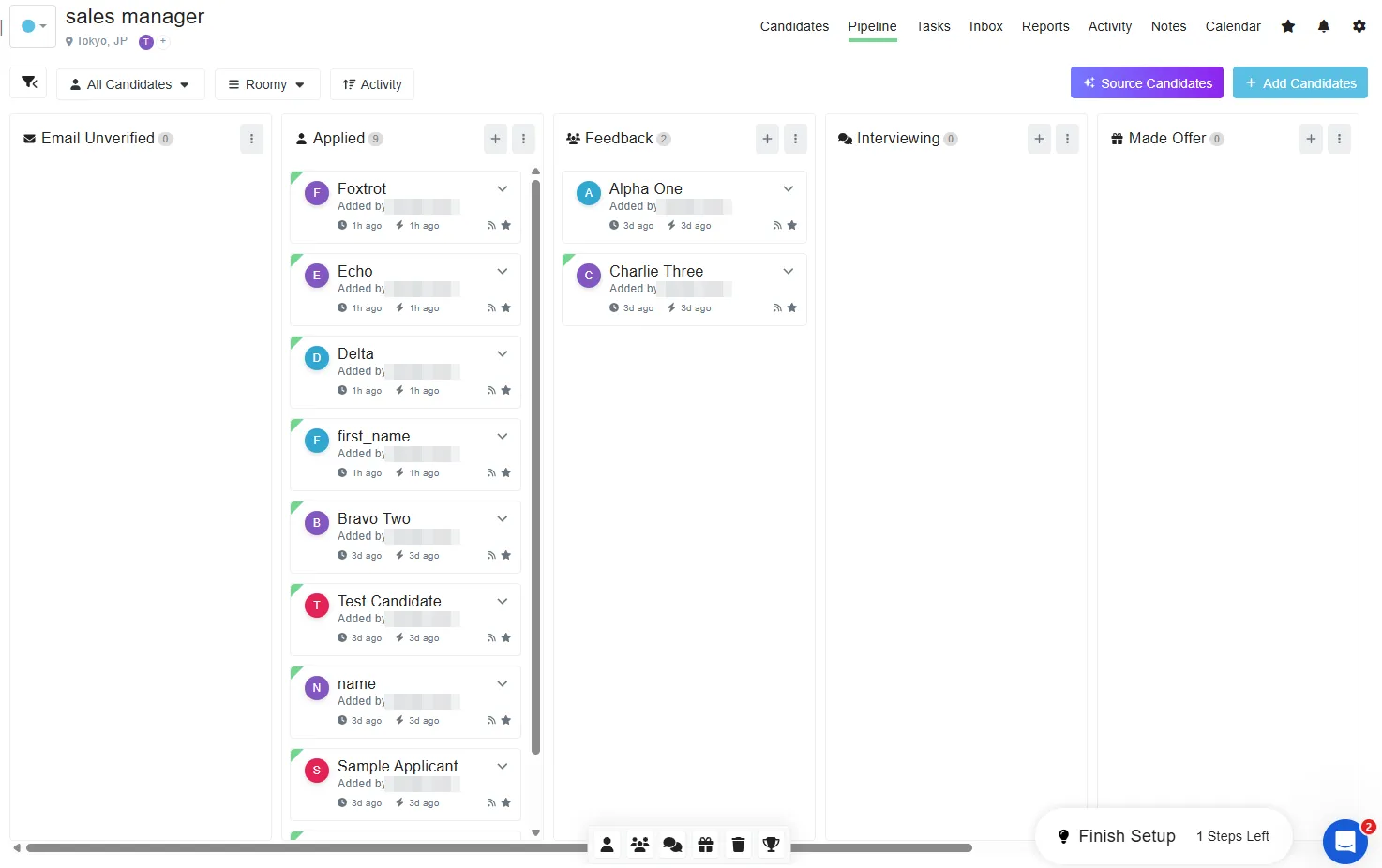
That matters more than it sounds. When a small company adopts an ATS, the real cost is not the subscription, it is getting three or four people who did not ask for a new tool to actually use it. If they have used a kanban board before, there is nothing to teach. Breezy gets this right.
A small inconsistency, visible if you compare the two screens: the board opens with an “Email Unverified” column, and the pipeline configuration for the same job lists six stages that do not include it — Applied, Feedback, Interviewing, Made Offer, Disqualified, Hired. What the configuration screen shows you and what the board shows you are not the same list.
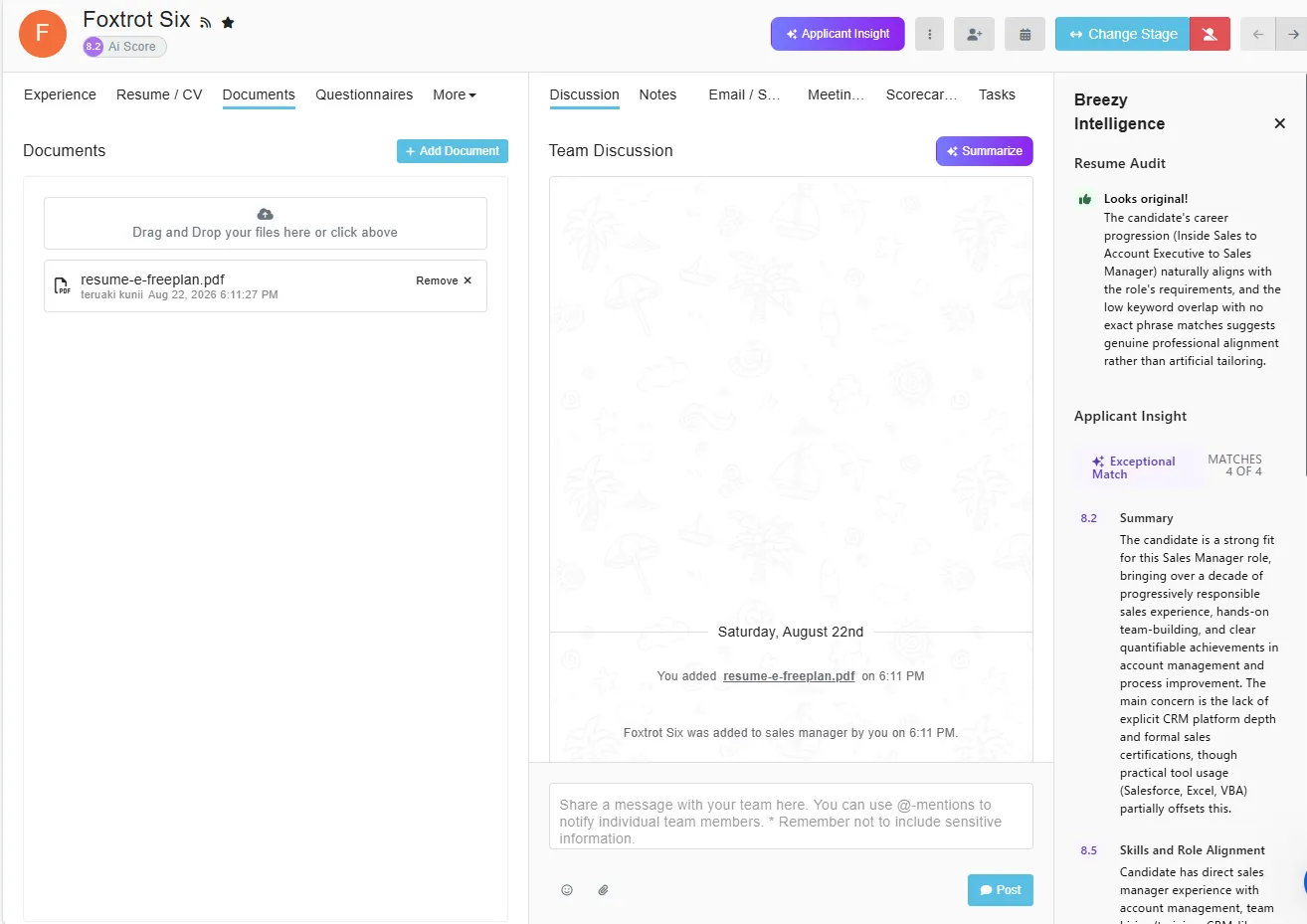
Each candidate has a discussion thread with @mentions, and Breezy logs your actions automatically — stage changes appear with timestamps. Be clear-eyed about who benefits from which. The discussion thread is worth something once three or more people are involved in hiring; if you are running this alone it does nothing. The automatic activity log helps even a solo recruiter, because six weeks later you can reconstruct why you passed on someone.
One oddity in that thread: the message box carries a standing note — “Remember not to include sensitive information.” But hiring discussion is intrinsically sensitive — “not enough experience for this,” “I want to ask why they left” — and that is precisely the content the thread is for. The warning and the feature are not compatible, and Breezy does not say where that conversation is supposed to happen instead.
Scorecards are the other notable gap. Job descriptions come with a template library; scorecards come with nothing at all. You build the sections and criteria from a blank page. The settings menu makes the omission look deliberate: it carries a TEMPLATES section holding eDocuments, Messaging, Nurture Campaigns and Positions — job posting templates included. Scorecards sit outside it, and so do questionnaires, which open just as blank: nine response types — including video responses and reference checks — and not one sample question. Creating a job does not help you either. I built a second position from scratch and saved it as a draft; Breezy generated no scorecard for it and suggested none. The scorecard field in the screening step is an empty dropdown of whatever you have already built yourself. That is backwards for the target customer: a company hiring its first sales rep knows roughly what a sales job posting says, and has no idea what to evaluate candidates against. The feature that needs a starting point does not have one — and it requires the Growth plan at $273/month.
What the free plan actually gives you
On 22 August 2026 I downgraded this account from the trial to Bootstrap, the free plan, and opened every screen against the same screen from the day before. Two things surprised me.
Nothing disappears. Thirteen items in Settings grow a padlock — Scorecards, Interview Guides, Questionnaires, Approvals, Custom Fields, Assessments, Background Checks and the rest — and not one of them leaves the sidebar. Pressing a locked item produces a price, not an error. The free plan is a showroom: you keep looking at the whole product from inside your own account.
Candidate export still works. I had predicted this would be the hard limit, because Breezy lists Bulk candidate actions as a Startup feature and export lives in that menu. I was wrong. With every column switched on I exported 29 columns and 17 rows on the free plan — the identical column set the trial produced, including the AI score column and a custom field I had built myself. Scores generated during a paid trial survive the downgrade and you can take them with you.
Update, 19 September 2026. The prediction I called wrong came back. On 11 September the export was still there and produced eighteen rows. On 19 September I could not find it. The interface had been rebuilt in between, the
More ▾menu was not on any of the six screens I checked, and selecting every candidate now produces a badge readingUNLOCK BULK ACTIONS WITH STARTUP PLAN— the same bulk-actions group this paragraph says the export lives in. I am not saying the export was withdrawn. I am saying I could not find it on that date, and that the paragraph above describes 22 August. The full sequence is in what the 30-day clause does.
What you actually lose is narrower than the comparison table suggests, and differently shaped:
| On the free plan | |
|---|---|
| Tasks, stage actions, automation | Gone behind an upgrade prompt |
| Scorecards and questionnaires you already built | Still in the account, no longer readable |
| Pipelines | Visible and still attached to positions; not editable |
| Candidate export, including AI scores | Worked on 22 August. Not found on 19 September — see the update above |
| The AI screening toggles | Still on, and still running |
| Candidates older than 30 days | One line above the plan cards reads “Bootstrap tier includes full access to candidates from the past 30 days.” |
Two of those deserve emphasis.
The scorecards and questionnaire I built during the trial were not deleted — they are in the account — but both management screens are replaced wholesale by an upgrade page. Structured interview criteria are exactly what a small team writes once and refers back to, and on the free plan you cannot read yours. Copy them out before you switch.
And the AI kept working. The two screening toggles were still on after the downgrade, so I uploaded one résumé to the free account to see whether they were decorative. Breezy scored the candidate immediately — 8.2, four of four criteria, a completed Resume Audit, no prompt and no paywall — and deducted 766 credits. Breezy’s own usage log attributes both operations not to me but to Breezy Bot.
One more thing about getting there: reaching a plan that costs $0 required a billing address and a credit card number, and produced a $0 invoice. The confirmation dialog is eleven words and a dollar sign, with no mention of what the change does to anything you have built.
I have written the whole comparison up — the before-and-after screens, the usage log, and what to do before you downgrade — in a separate piece on the free plan.
The real cost is not the subscription
Breezy’s Startup plan is $157/month billed annually, $189 monthly. The full breakdown — every tier on both billing bases, what the free plan drops after thirty days, and where that $189 does and does not appear — is in Breezy HR pricing: the monthly price is not on the page. Here I am after something else: $157 is the number people compare across ATS vendors, and it is the wrong number to be comparing. Three costs sit on top of it. Two of them are larger than the subscription; the third is tiny, and you are not allowed to find out how tiny until you register a card.
Getting the job in front of people. On the Advertise step, LinkedIn and ZipRecruiter Boost were offered together for $723.00, described as a limited-time discount saving you $75. A second bundle — LinkedIn, Veteran Job Boards and Diversity Jobs — was $833.00. Those are single bundles, for a single role. The cheaper of the two is 4.6 times the monthly cost of the software that manages it.
Breezy’s own AI is not in the plan either
Breezy Intelligence — the scoring, the résumé audit, the summariser, the job-description writer — is not included in any subscription tier. It does not appear on the four plan cards. It appears in a list headed Feature add-ons, next to SMS messaging, and it is bought with credits.
The trial ships with 100,000 of them, and the product never converts that number into
money. Every AI screen speaks only in credits: 401 credits, Used: 4,291 / 100,000. There
is a + More Credits button, and it is disabled until a payment method is on file. So for
the eleven days I ran this account without a card, the question “what does this cost?” had
no answer available anywhere in the product.
Registering a card unlocked the screen. It reads, in its entirety: $30, added in increments of 100,000, up to 1,000,000 per account, and credits never expire. That works out at:
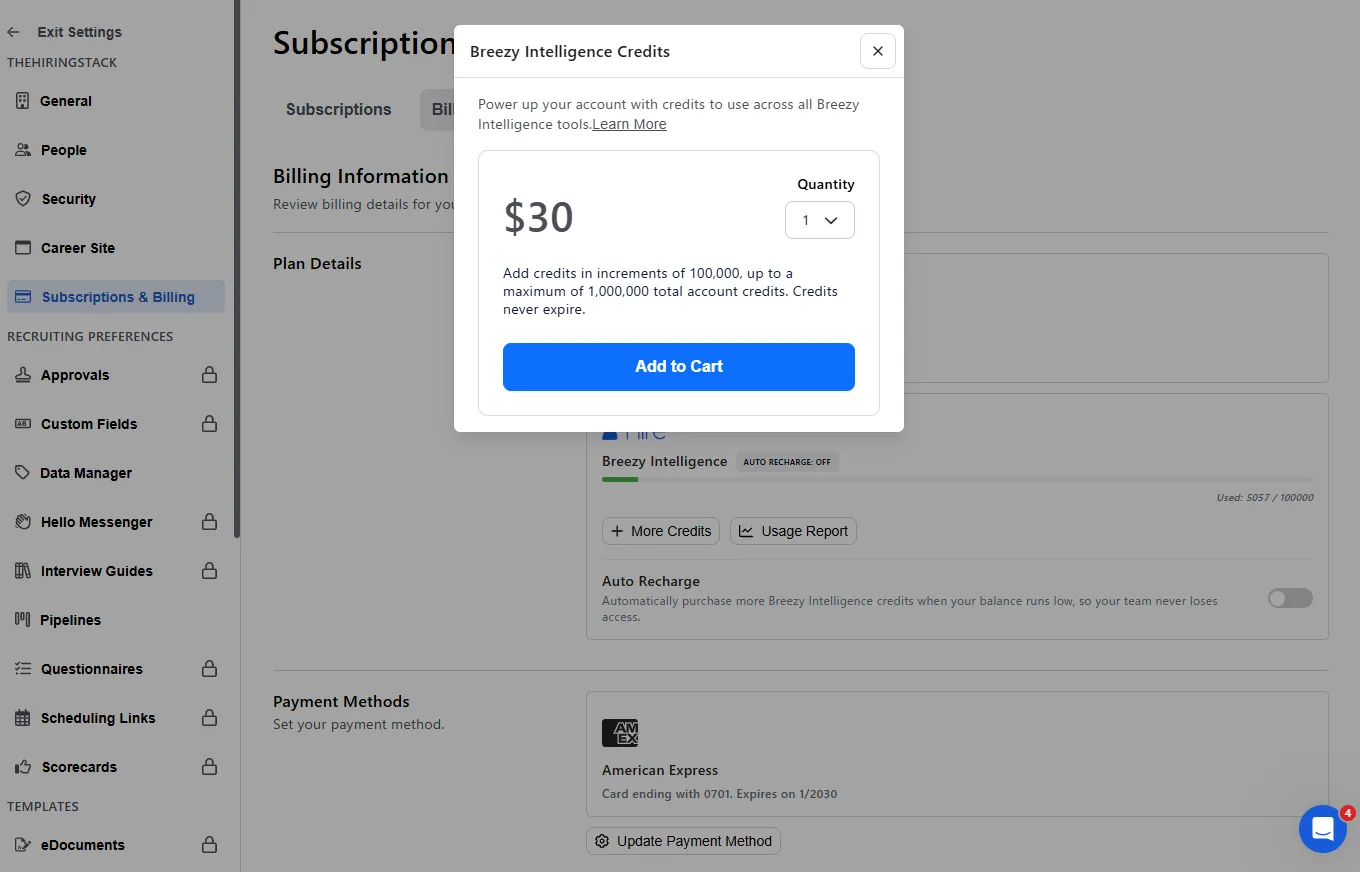
| Credits | Cost | |
|---|---|---|
| One candidate, scored and audited | ~766 | about $0.23 |
| Writing one job description with the AI | 291–348 | about $0.10 |
| The full trial allowance | 100,000 | $30 |
So Breezy’s own AI is cheap — about twenty-three cents a candidate, which is the opposite of what a five-digit balance draining 400 at a time feels like. The finding is not the price. It is that the price is unknowable until you hand over a card, and that the number you are shown instead is designed to be watched rather than converted.
Three things about that meter are worth budgeting around.
It does not hold still. Across thirteen logged operations, Applicant Insight cost 363, 395, 397, 400 and 401 credits; Resume Audit 369 to 377. Presumably this tracks input length. Nothing is estimated before you trigger anything.
Writing a job description spends it. Before I had run a single candidate screening, 1,242 credits — 29% of everything I would eventually spend — had already gone on two AI job descriptions and two candidate activity summaries. Nothing on those screens says the button costs anything.
Nobody has to press anything. Breezy emails a usage report with an Initiated By
column, and across the whole account six of thirteen AI operations are logged as
Breezy Bot. Uploading a résumé to a position with the toggles on runs both AI features
automatically, in a fixed order, eight seconds apart. That is also true on the free plan,
where I watched it happen and watched the balance drop. To Breezy’s credit the log exists at
all — most vendors give you a balance and no itemisation. But it is a record of spending you
did not authorise, kept by the party doing the spending.
The AI Tools screen is other companies’ products
Breezy’s own AI is the layer described above: a summary that invents events, a job-description writer that ships placeholders, and two scoring toggles. There is also a settings screen called AI Tools, and nothing on it is Breezy’s. It lists two products from other companies.
The first, Claira, is a workforce-competency platform: it maps what the employees you already have are able to do. It is not a hiring tool, and for a company hiring its first sales rep there is nothing there. The second is Mega HR, whose AI recruiter Megan is pitched as handling resume screening, outreach, scheduling and interview summaries inside Breezy. Mega HR says it can take on up to 78% of frontline hiring tasks. I have not tested that claim, and this review does not endorse it — what I can check is the price.
Megan is a separate subscription to a separate company. Mega HR’s published pricing, as of August 2026, starts at $82/month for up to three open jobs, $207 for ten, $416 for twenty-five — all billed annually, the same basis as Breezy’s $157. The AI itself is metered on top of that:
| Add-on | Price | Overage |
|---|---|---|
| AI Shortlisting (candidate scoring) | $25/mo for 100 candidates | $0.89 each |
| AI Interview Insights | $199/mo for 100 | $3.50 each |
| AI Interviews | $299/mo for 100 | $6.00 each |
So a three-person company running Breezy Startup, hiring for two roles, and using the AI interviewing it came for pays $157 to Breezy and $381 to Mega HR. That is $538/month, and the applicant tracking system is under a third of it.
To Breezy’s credit, the screen is filed under Integrations in the settings sidebar, next to job boards and background checks. But it is titled AI Tools and introduced as “AI-powered tools to enhance your recruitment workflow,” and nothing on the screen itself tells you that these are other companies’ products on separate subscriptions, or what they cost. You find that out on the vendor’s own site, after you go looking.
Clicking a card does not take you to a product page. Either one opens the same modal, headed 🚨 Heads-Up 🚨: “Enabling Partner APIs will allow access to all Breezy data in this account, including potentially sensitive hiring information. That information could be extracted outside of Breezy controls and security using the APIs.” The bluntness is to Breezy’s credit — most integration flows bury that sentence in a permissions list nobody reads. But it is the same text for both vendors, with one button marked I Agree. There is no per-vendor scope, no list of what a given product would read, and still no price. The screen that could tell you what a partner costs asks you to sign over the account first.
What this means for the number you compare
If you are a small company budgeting for hiring, the ATS subscription is not your hiring spend. It is the rounding error next to what it costs to get the role in front of people, and next to what the AI actually costs once you want it to do the work it is advertised as doing. Any ATS comparison that stops at the monthly fee — and nearly all of them do — is measuring the small half.
Worth adding at the other end of the scale: task management, being reminded what you need to do next, requires the Startup plan. Not an advanced capability, just ordinary administrative memory, and it is not in the free tier. Note also that the same plan is quoted at two prices in the same session — $157 on the comparison page, which defaults to annual billing, and $189 in the upgrade prompt that appears when you press the locked feature.
Who should use Breezy HR
Use it if you are a team of roughly three to fifteen, you want a pipeline your colleagues can use without training, and you are willing to treat the AI features as off. On that basis it is a good tool. The kanban board, the automatic activity log and the duplicate-checking import are solid work, and the free Bootstrap plan is a real free plan rather than a trial in disguise — though reaching it requires giving Breezy a card, and any AI toggles you leave on will keep running and keep spending after you get there.
Look elsewhere if you are migrating a rich candidate spreadsheet and expect it to arrive intact, if you are a solo recruiter — most of what justifies the price is collaboration features you will not use — or if anyone on your team would read an AI summary and act on it. That last one is not a preference. On the evidence here, that summary can tell you a candidate applied and was evaluated when neither happened, and the product gives you no prompt to check.
Check three things before you commit, whichever way you lean. Whether your team would ever act on an AI summary without opening the record underneath it. Whether you can live with AI pricing you cannot convert to money until you have registered a card. And, if you plan to sit on the free tier, whether the work you build inside Breezy — scorecards, questionnaires, interview criteria — also exists somewhere you can still read it.
My rating reflects that split: competent software carrying a feature that misreports facts about people, on the screens where those facts decide something.
For how Breezy compares against a per-seat competitor on the same data, see Breezy HR vs Manatal.
Disclosure: the link to Breezy HR in this review is an affiliate link, which means I may earn a commission if you sign up through it. It costs you nothing extra, it does not change the rating, and I do not accept payment in exchange for a favourable review.