Breezy HR’s 30-day limit does not delete. It scrambles names.
In what Breezy HR’s free plan actually includes I quoted one line that sits above the plan cards, in small text, outside any card:
Bootstrap tier includes full access to candidates from the past 30 days.
Every candidate in the account was younger than 30 days when I wrote that, so I ended the piece with an admission: I cannot yet tell you what the 30-day clause does. The oldest seven candidates had been added on 11 August, which put them at the boundary on 10 September.
This is the follow-up. I watched the same eighteen candidates across 9, 11, 19 and 23 September on the free Breezy HR (affiliate link) plan, adding nothing and moving nothing. Here is what the clause does.
The short version
- Nothing is deleted. The candidate count stayed at eighteen the whole time. The rows are still there, in order, with their dates intact.
- The names are replaced by random strings. Name, email, headline and “sourced by” become character salad. The stage, the position and both timestamps stay readable.
- The replacement is regenerated on every load. I have four different strings for the same candidate. Every one of them has the same shape as the real name — same character count, same position of the space.
- Search still finds them by their real name. Type the original name and you get one hit, displayed under a scrambled label. Whatever is hidden, it is not gone.
- The boundary is 30 days, not one month. I measured it twice in one day: on two candidates that had passed 30 days without reaching a calendar month, and on two more that crossed 30 days that evening.
- Left alone, it reaches everybody. By 23 September the count still read eighteen and not one name on the page was readable.
- One screen calls them
Candidate not found. The same candidates, at the same moment, are listed in the candidate table and returned by search. - The export I used on 11 September was not on the screen on 19 September. The
interface had been rebuilt in between, and bulk actions now read
UNLOCK BULK ACTIONS WITH STARTUP PLAN.
The last two are the ones I would want to know before downgrading.
The boundary is 30 days
On 9 September, day 29, all eighteen candidates were readable and the export produced eighteen rows. On 11 September, day 31, the seven added on 11 August had turned into strings. That is a two-day window — enough to say “about thirty days” and not enough to say which rule was running. Thirty days and one calendar month are different boundaries, and both had passed.
Eleven candidates were added after those seven, which meant the question could be asked again. On 19 September at 16:37 Japan time, two of them decided it — and two more crossed their own thirty-day mark later the same evening, at 23:13:
| Candidate | Added | 30 days | One month | At 16:37 | At 23:25 |
|---|---|---|---|---|---|
| Delta Four | 19 Aug, 22:09 | 18 Sep, 22:09 — passed | 19 Sep, 22:09 — not yet | Scrambled | Scrambled |
| Echo Five | 19 Aug, 22:25 | 18 Sep, 22:25 — passed | 19 Sep, 22:25 — not yet | Scrambled | Scrambled |
| name / Zulu Nine | 20 Aug, 23:13 | 19 Sep, 23:13 | 20 Sep, 23:13 — not yet | Readable | Scrambled |
| Foxtrot Six | 22 Aug, 18:11 | 21 Sep, 18:11 — not yet | not yet | Readable | Readable |
If the rule were a calendar month, Delta Four and Echo Five would have been readable for another five and a half hours. They were not. And the other side holds: the newest scrambled row was added at 22:25 on 19 August, the oldest readable row at 23:13 on 20 August, so the line falls between them.
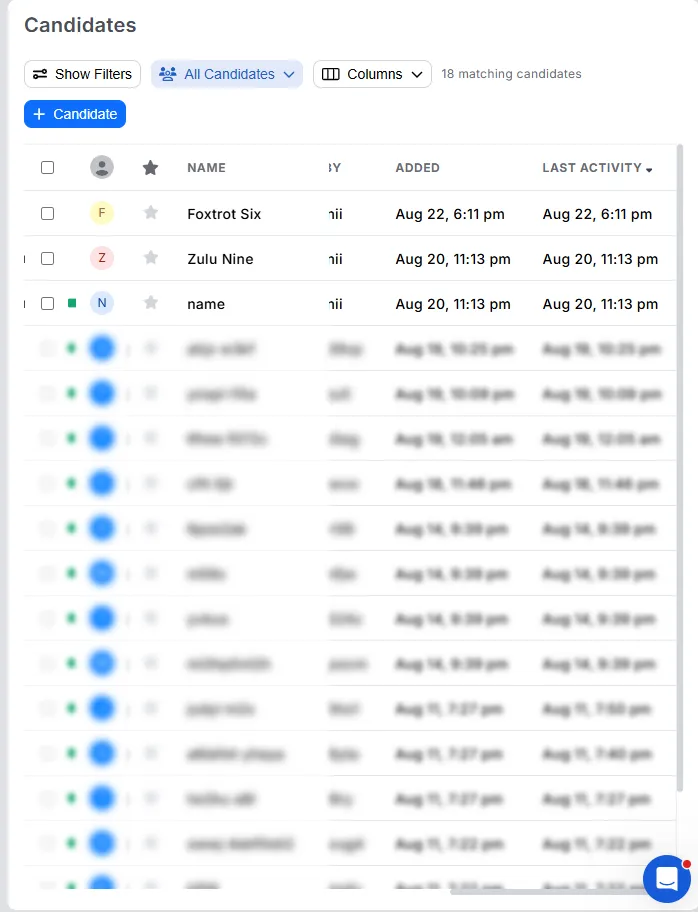
The evening check is the same test run in the other direction. name and Zulu Nine were
added at 23:13 on 20 August, so they passed thirty days at 23:13 that night and will not
reach a calendar month until 20 September. At 23:25 they were scrambled. Nothing but the
thirty-day line had moved.
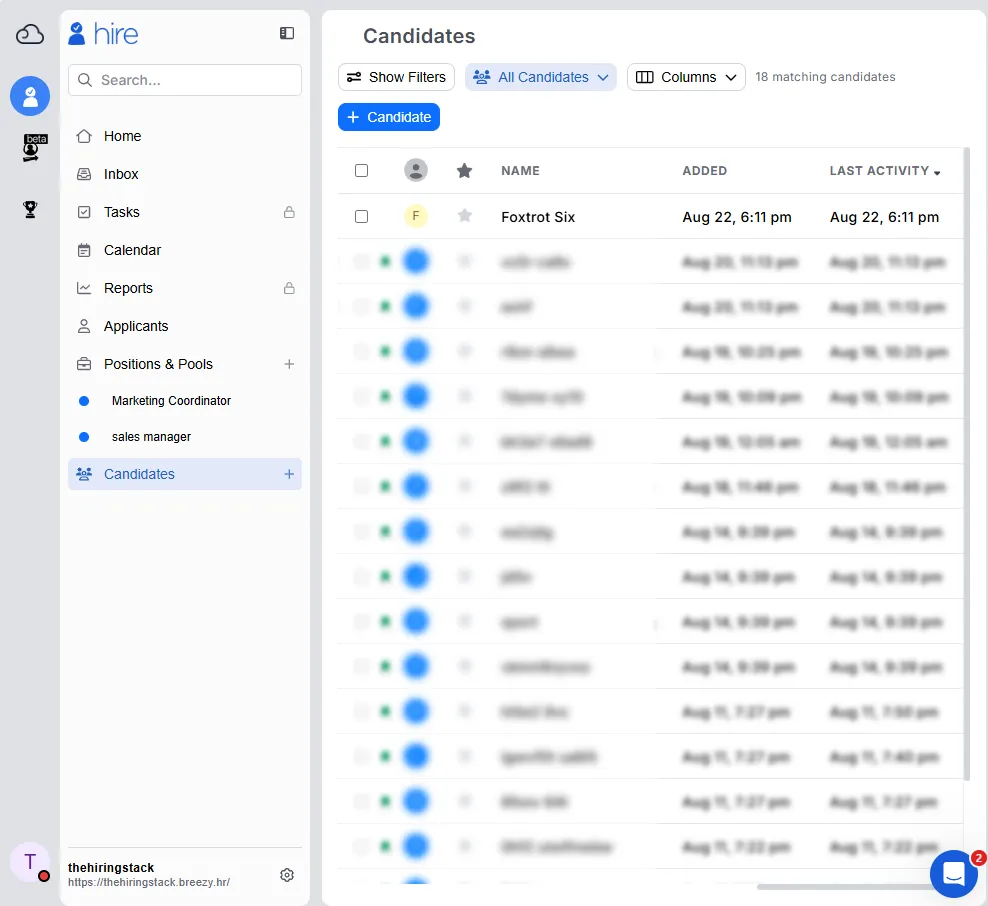
One caveat I cannot remove. The screen and the export agree on timestamps, but I have not confirmed that Breezy stores them in Japan time. If the account is running on US Eastern, every boundary above shifts, though not by enough to bring a calendar month back into contention. And I never watched a row turn: the pair was readable 6 hours 36 minutes before their thirty-day mark and scrambled 12 minutes after it, so my observations bracket the line at roughly 29 days 17 hours and 30 days — consistent with thirty days, and close to it, but not measured to the minute.
By 23 September there was nothing left to read
Foxtrot Six, added at 18:11 on 22 August, was the last readable row in the account. It
passed thirty days at 18:11 on 21 September. I opened the list again on the 23rd, having
added nothing and moved nothing in between, and the header still said
18 matching candidates — with not one readable name underneath it.
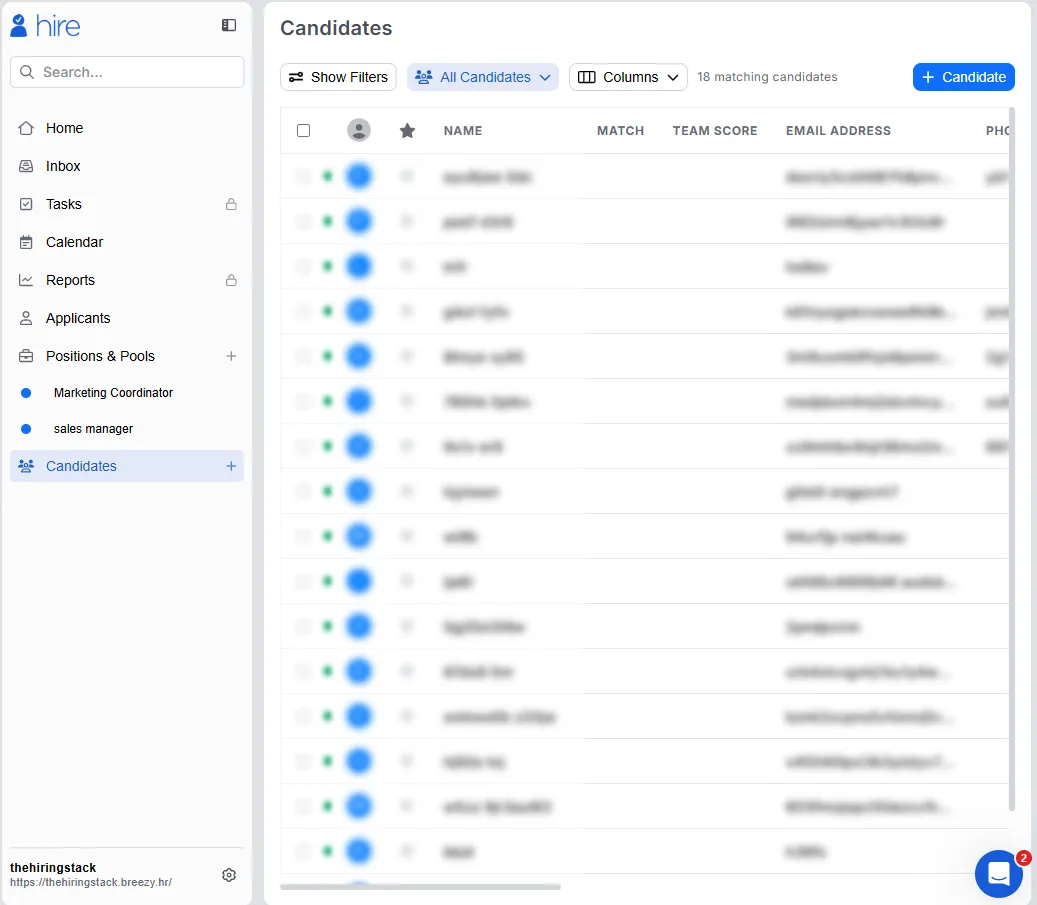
That is where the clause arrives if you stop adding people. It is not a smaller archive of recent candidates sitting next to an older one you can still consult. Given enough time, every person in the account is displayed as character salad, and what the free plan still tells you about them is the date they were added and the stage they are in.
The rows survive. The contents do not.
This is the part I did not expect. On 11 September the count above the list still read eighteen. Nothing had been removed. Seven rows had simply stopped being about anybody:
| 9 September (day 29) | 11 September (day 31) |
|---|---|
Dummy Person | ignhn 6fkb6t |
dummy-person@example.com | 4ekdk1l3vg47ezyhwfv4cbbn |
Alpha One | jo70t hsy |
alpha-192446@example.com | oyngjx8wr5tsz0s2v7be16vr |
Look at the shape rather than the characters. Dummy Person is five letters, a space, then
six. ignhn 6fkb6t is five, a space, six. Every one of the seven kept its original
character count and the position of its space. The email addresses lose their @ and their
dots and keep their length.
The stage, the position, the date added and the date of last activity were not touched. Neither was the avatar, exactly — the coloured initial becomes a plain circle, but the row keeps its place in the sort order, because the thing the sort reads is still correct.
The string is different every time you look
I have four records of how one scrambled candidate was displayed, taken on two different days. No two of them agree:
| Where | Displayed as |
|---|---|
| Export, 11 September | 2g6tno iv8hz72vd |
| Search, 11 September | 4g2a64 389rmvr9i |
| Search, 19 September, 16:37 | m4ys7y jj57yz8hp |
| Search, 19 September, 17:15 | j0vt50 aojfz0atf |
The candidate is Sample Applicant: six characters, a space, nine characters. So is every
row in that table. Loading the pipeline board twice in the same session produced
6lljt wd4z and then 60gbw 63t2 for a different candidate — both five, space, four, both
matching Delta Four.
A one-time anonymisation would not behave like this. What this looks like is a value generated at display time, from something that still knows how long the real name is.
Search knows the real names
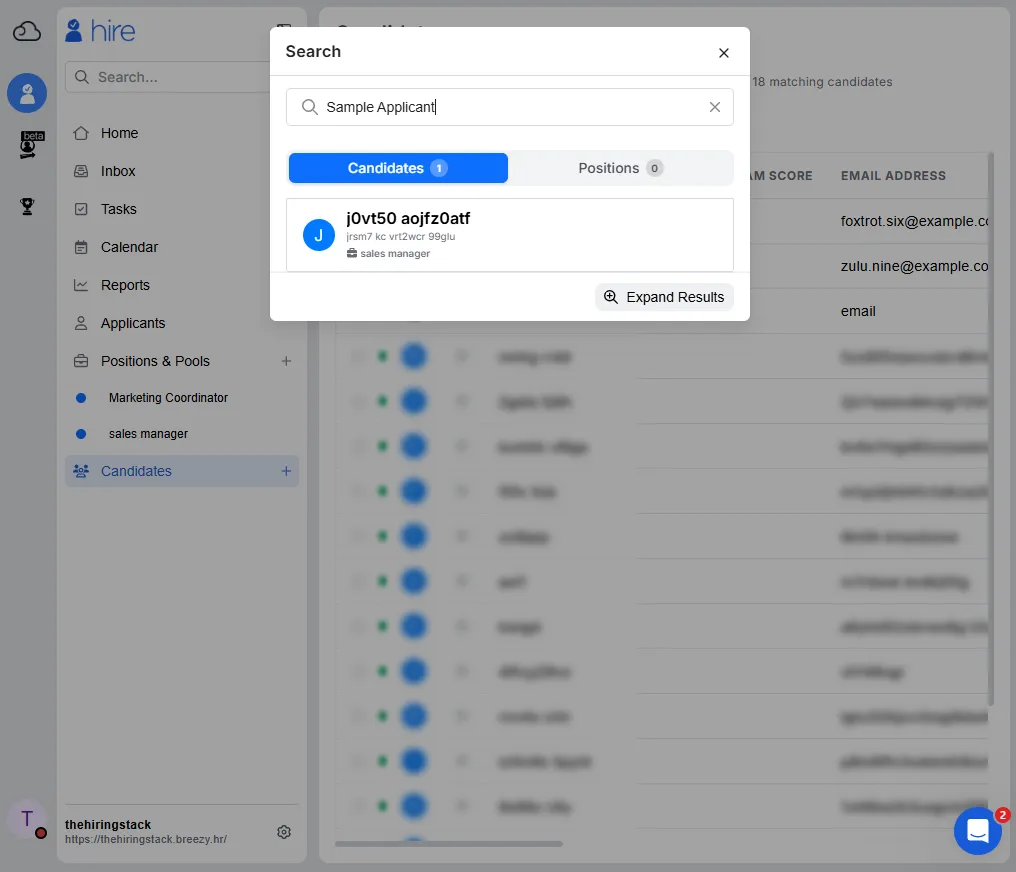
Typing Sample Applicant returns Candidates 1. Typing Delta Four returns
Candidates 1. The index is matching on names the interface will not show you. Both of
the names I tried on 19 September returned exactly one candidate.
Two details in that screenshot are worth naming. The position tag, sales manager, is not
scrambled — the same fields that survive in the list survive here. And the avatar shows
J, the first character of the generated string, not the S of Sample Applicant. The
initial is derived from the replacement, which means the replacement exists before the
avatar is drawn.
I want to be careful about what this does and does not prove. It tells you the data is still in the account and still indexed. It does not tell you that upgrading would give it back, because I did not upgrade, and I am not going to tell you that a payment fixes something I have not watched get fixed.
Three screens, three explanations, one of them wrong
Here is where a reader trying to work out what happened runs into trouble. The same restriction, on the same candidates, is described three different ways depending on how you arrive at it.
Click the row in the candidate list, and you get the clearest of the three:
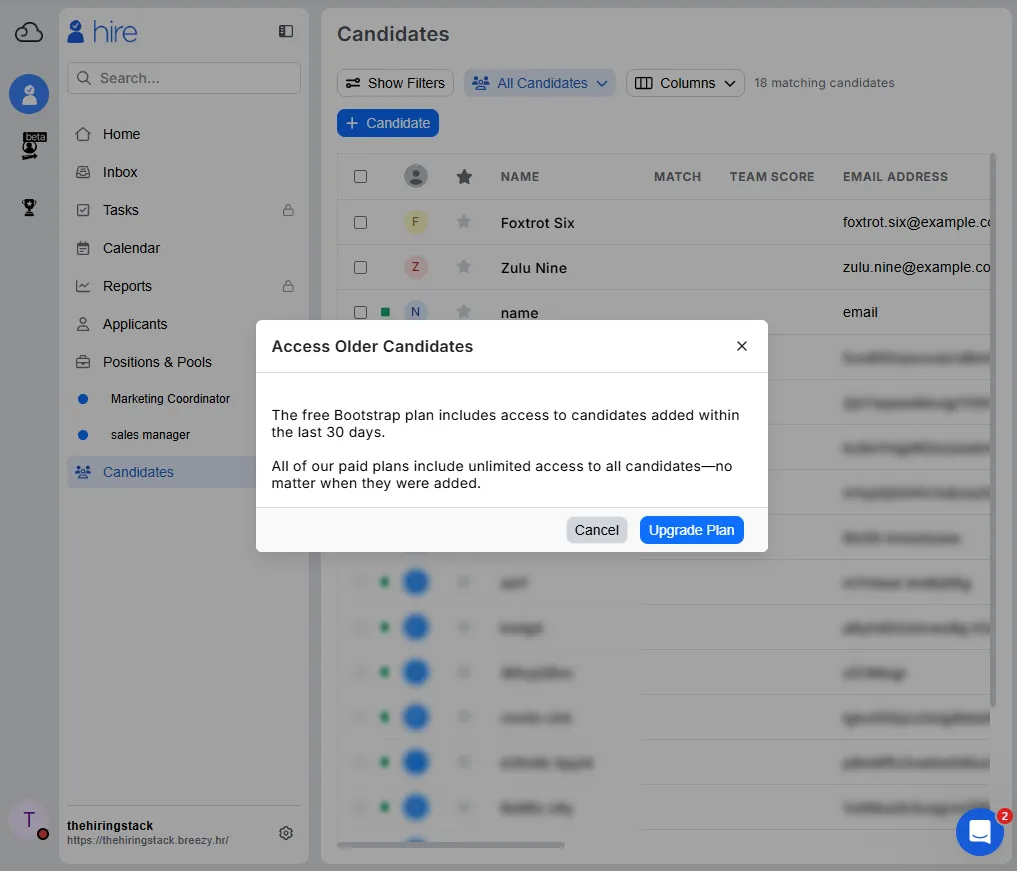
Access Older Candidates The free Bootstrap plan includes access to candidates added within the last 30 days. All of our paid plans include unlimited access to all candidates—no matter when they were added.
That is a good dialog. It names the plan, it names the window, and it says what the paid plans do instead. It is also an improvement on what the same product showed me eight days earlier, and I should say so plainly. On 11 September, opening a candidate by URL produced this:
Candidate Unavailable This candidate is unavilable on your current plan. Would you like to upgrade?
That one never mentions thirty days, and it misspells unavailable. The newer dialog fixes
both. Whatever else changed in between, this part got better.
Open the same candidate by URL on 19 September, though, and you get neither:
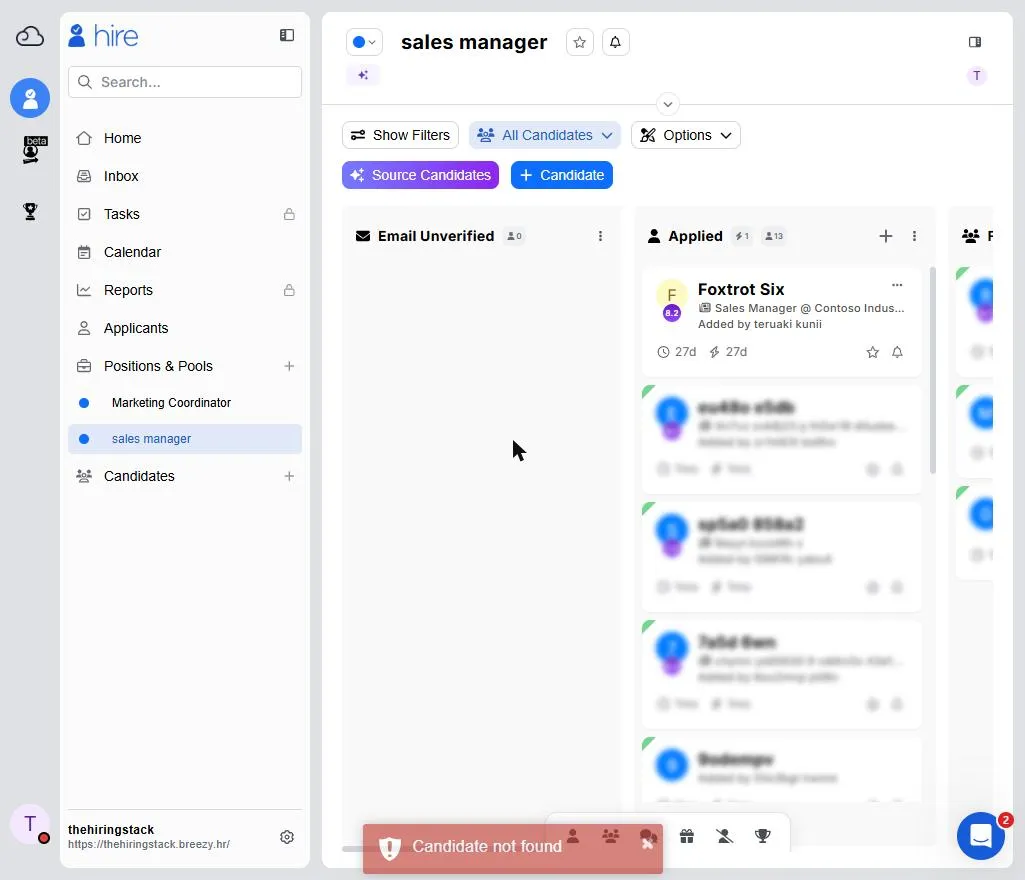
The URL does not change. The application quietly redirects to the pipeline board, and a red toast appears in the bottom-left corner for a few seconds:
Candidate not found
I tried all three of the direct links I had recorded. All three behaved identically.
At that moment, that candidate was a row in the candidate table, was returned by search under a generated name, and was sitting on the pipeline board four inches above the toast. “Not found” is not a description of any of that. The list says older than thirty days. The URL says does not exist. They are the same candidate, one minute apart.
I am not going to call this deceptive, because a paywall that leaks through a routing error is the most ordinary bug in software. But the effect on somebody checking whether their data survived a downgrade is the same either way: the answer they get depends on which door they knock on, and one of the doors tells them their candidate is gone.
The export moved, and I could not find where
This is the part that changes the advice I gave in the earlier article, where I told readers to export before downgrading rather than after.
On 11 September I could still export. More ▾ → Export Candidates produced a CSV of
eighteen rows and fifteen columns — the same row count, the same columns and the same byte
count as the file I had pulled on 9 September. The difference was inside: three columns of
seven rows had been replaced by the same generated strings as the screen.
That is worth sitting with for a moment. If you export on the way out and check your work the way most people check their work — does the row count match, are the columns all there, did the file open — this file passes every one of those checks and is wrong. Nothing on the export screen, before or after, mentions it. It is the mirror image of what happens on the way in, where the import maps four of your columns and turns your header row into a candidate.
On 19 September I went to do it again, and the interface was not the one I had used eight
days earlier. The navigation had gone from dark to light, the items had been reordered, the
candidate list had new controls and a new column layout, and the More ▾ menu was not on
it. I looked in six places: the global candidate list, the candidate list inside each of
two positions, the pipeline board’s Options menu, a stage’s overflow menu, and the
Applicants screen. No export.
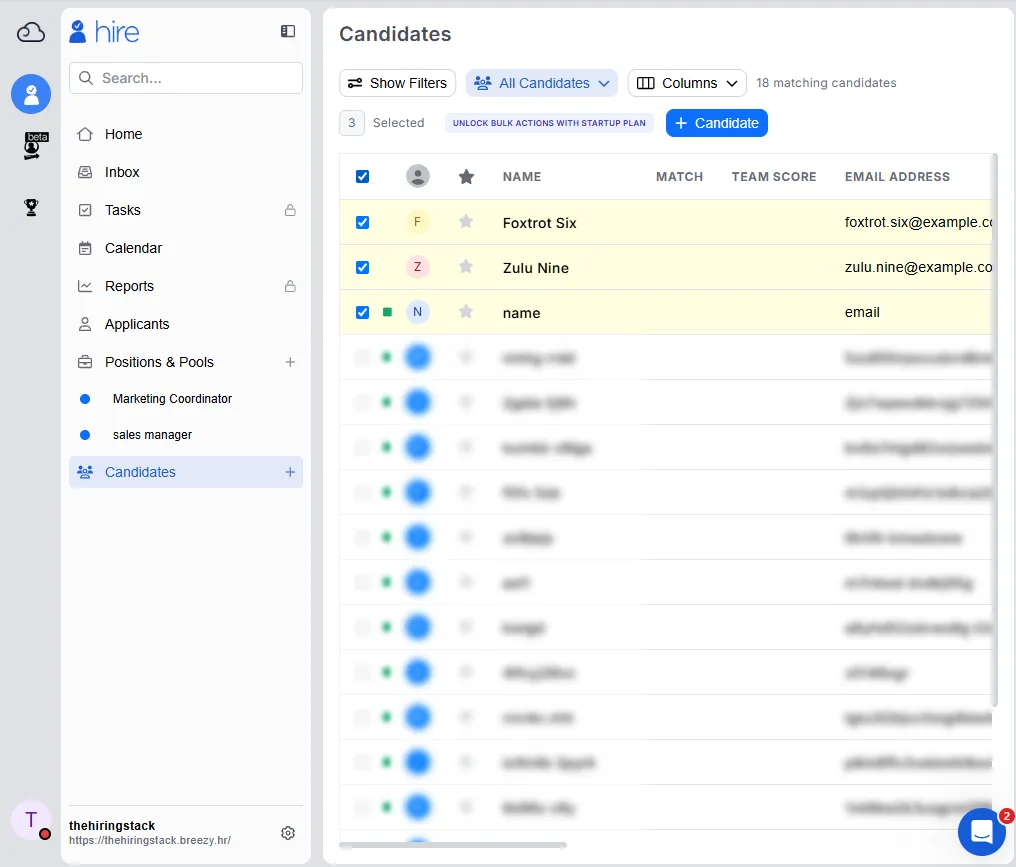
Selecting all eighteen candidates selects three. The fifteen scrambled rows cannot be
ticked, and the badge that appears reads UNLOCK BULK ACTIONS WITH STARTUP PLAN.
I am not going to tell you the export was removed from the free plan. I did not find it; that is a different claim, and eight days is a short time to redesign an application in, so I may simply be looking in the wrong place on a screen that moved. What I can tell you is the sequence: on 11 September a free account could export eighteen rows from this menu; on 19 September that menu is not where it was; and the bulk-action group the export belonged to now carries an upgrade label.
If you are downgrading, that sequence is the reason to export first and to check the contents of the file, not its row count.
What the product tells you before it happens
Nothing, on the screens where it would matter. Across three separate sessions — 6, 11 and 19 September — I looked at the dashboard, the top of the candidate list, the notification area and the inbox for any warning that candidates were approaching the boundary. There is none. No banner, no colour change on rows about to cross, no note on the candidate detail.
The sentence on the billing page has not changed since I first quoted it:
Bootstrap tier includes full access to candidates from the past 30 days.
And I will give it this: nothing that happened contradicts it. “Full access to the past 30 days” does not promise anything about day 31. The problem is not that the sentence is false. The problem is that it is the only place the rule is written, it is above the plan cards rather than in the comparison table, and until you cross the line nothing tells you what the other side looks like.
The Access Older Candidates dialog is the first screen in this product that explains the
rule at the moment it bites. I did not see it on 11 September — though on that day I opened
candidates by URL rather than from the list, so I cannot tell you whether it was already
there and I took the other door.
If you are about to downgrade
- Export first, and open the file. Check a name you recognise, not the row count. A scrambled export has the right number of rows, the right columns and the right size.
- Do it while you are still on the paid plan. On 11 September the export was there. On 19 September I could not find it. I do not know which of those you will get.
- Copy anything you need out of the candidate records themselves — notes, emails, resumes. The list view survives the boundary; I have not verified that everything inside a candidate does.
- Do not use the URL of a candidate to check whether your data survived. That path
reports
Candidate not foundfor candidates that are demonstrably still there. - Count 30 days from when the candidate was added, not from when they applied or when
you last touched them. The field the rule reads is
Added.
If you are leaving rather than downgrading, these are the five questions I ask every ATS.
What I still cannot tell you
- Whether upgrading restores the names. The dialog says paid plans include unlimited access to all candidates. I did not pay, so I did not watch it happen.
- Whether the export was moved or withdrawn. See above.
- What happens inside a scrambled candidate’s record. Opening one is what produces the dialog, so the contents are not reachable to check.
- Whether the boundary is exactly 30 days to the minute. The closest pair I watched was readable 6 hours 36 minutes before their thirty-day mark and scrambled 12 minutes after it. That brackets the line between roughly 29 days 17 hours and 30 days, but I never saw a row change.
- Whether any of this is announced by email. Nothing arrived in my account, but an account with real hiring volume may be treated differently.
Which tool handles this better?
The question I would put to a competing product is not “is there a free plan” but what does your free plan do to the records it stops showing me? There are three honest answers: delete them and say so, keep them and show them read-only, or keep them and hide them. The third needs the most explaining. From the inside it looks like data loss, and from the outside it looks like data retention.
Breezy’s answer is the third, and as of 19 September it explains itself at one entry point and not at the other two. Manatal answers a different version of the same question by replacing the entire product with a checkout page, which at least has the virtue of being unambiguous.
If you are weighing the two, the full Breezy HR review and the side-by-side comparison cover what each one costs to keep. This article is about what they cost to leave.
Disclosure: the Breezy HR link in this post pays me a commission if you sign up through it, and it is marked where it appears above. It costs you nothing extra, it did not change a word of what this post says, and I do not accept payment in exchange for favourable coverage. Every other link here is an ordinary one.