I downgraded Breezy HR to the free plan. The AI kept scoring.
On 22 August 2026 I moved a Breezy HR (affiliate link) account from the paid trial down to Bootstrap, the free plan. I had spent the previous eleven days photographing every screen I could reach on the trial, specifically so that I could open the same screens afterwards and compare.
I expected to write about what vanished. That is the normal shape of this article: here is the feature list, here is what the free tier takes away, budget accordingly.
That is not what happened. Almost nothing vanished. What I found instead was the opposite problem, and it cost me money — a very small amount of money, which turns out to be part of the story.
The short version
- Nothing disappeared from the interface. Thirteen items in Settings grew a padlock. Not one of them left the sidebar.
- The AI screening still runs. I uploaded one résumé to the free account. Breezy scored it, audited it, and deducted 766 credits. There was no prompt, no confirmation, and no upgrade wall.
- Candidate export still works, including the AI score column — which I had predicted would be the free plan’s hard limit. It was not.
- Two things I built during the trial are now unreadable. The scorecards and the questionnaire were not deleted. They are simply behind a price.
- Switching to a $0 plan required a billing address and a credit card number, and produced a $0 invoice.
- No screen — before the downgrade or after — tells you any of this.
What I did, in order
Precision matters here, so: the account was a Breezy Hire trial with 100,000 Breezy Intelligence credits, of which 4,291 were used. It held 17 test candidates across two draft positions, a custom pipeline, two scorecards, one questionnaire, one saved stage action, and four candidates that had been scored by Breezy’s AI during the trial.
I did not delete anything before downgrading. The whole point was to see what the plan change would do to it.
The route to the free plan is Settings → Subscriptions & Billing → Modify Subscription. Not “Cancel Subscription” — that button also exists, lower down the same page, and it does something else entirely.
A $0 plan that wants your card
Selecting Bootstrap put it in a cart. Total: $0.
Then Breezy asked for a billing address. Then it asked for a credit card number. On a plan that costs nothing, on the way to a cart totalling zero dollars.
I entered a real card, because the alternative was not finishing the test. If you are downgrading a live account to control cost, note that the free tier is not reachable without giving Breezy a payment method.
The final confirmation dialog reads, in full:
Change Subscription
Confirm your choices and we’ll update your subscription.
Hire Bootstrap — FREE
Total — $0
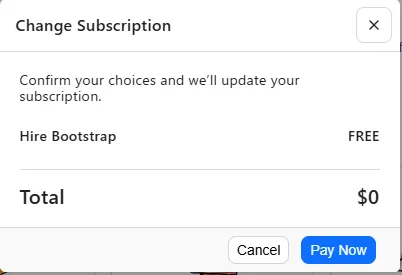
That is the entire text. There is no line about features being disabled, no line about data being restricted, no line about what happens to work you have already done. I read the dialog twice looking for a link to a support article. There is none.
Afterwards, the Billing History table — which said “No invoices have been created yet” an hour earlier — held one entry: 22 August 2026, $0.00, Paid, invoice 9EICPSOM-0001.
Nothing disappeared. Thirteen things grew a padlock.
The first screen I compared was the Settings sidebar, top to bottom, against the same sidebar from the day before.
Every item was still there. Thirteen had gained a small padlock icon: Approvals, Custom Fields, Hello Messenger, Interview Guides, Questionnaires, Scheduling Links, Scorecards, eDocuments, Nurture Campaigns, Assessments, Background Checks, HRIS Connections.
Thirteen had not: General, People, Security, Career Site, Subscriptions & Billing, Data Manager, Pipelines, Messaging, Positions, API & Automation, Job Boards, Sourcing, AI Tools.
This is a design choice rather than an accident, and it is worth naming: the free plan is built as a showroom. You keep seeing the whole product. You are shown the shape of the thing you are not allowed to use, permanently, from inside your own account.
Pressing a locked item does not produce an error. It produces a price.
The padlock is not the only way this product refuses you, and it is the better way. On the Advertise tab there is no padlock and no reason — only a line telling you to contact support. The free channel that needs an approval.
The part I got wrong
Before the downgrade I had written, in my notes, that the free plan would almost certainly block candidate export. Breezy’s own plan comparison lists Bulk candidate actions as a Startup feature, and export lives in the bulk actions menu. It looked settled.
It was wrong. On the free plan I opened the candidate list, turned on every column, pressed More → Export Candidates, and got a CSV with 29 columns and 17 rows — byte-for-byte the same column set the trial produced two days earlier, including the custom field I had created myself.
The AI columns came with it:
name,ai-score,ai-score-audit,...
Echo Five,8.1,Looks original!,...
Delta Four,8.1,Looks original!,...
Gamma Three,7.2,Looks original!,...
Beta Two,8.2,Looks original!,...
So: scores generated during a paid trial survive the downgrade, and you can take them with you. That is genuinely good, and I would rather report it than the prediction I preferred.
One trap here, which caught me for an hour: immediately after the downgrade the export was only 17 columns, and I nearly wrote that the free plan strips fields. It does not. In Breezy, the export contains exactly the columns your candidate list is currently displaying, and the plan change had reset those checkboxes. All 28 column options were still present and still selectable. Turn them on and the full export comes back.
Then the AI ran on its own
This is the finding I did not expect and cannot explain away.
The trial had left the two AI screening toggles — Applicant Insight and Resume Audit — switched on for the Sales Manager position. After the downgrade they were still on, still editable, with the four scoring criteria still listed and still editable. My first assumption was that they were decorative: on-screen, dead underneath.
So I tested it. I noted the credit balance (Used: 4,291 / 100,000), uploaded a single
résumé PDF to the free account as a new candidate, and watched.
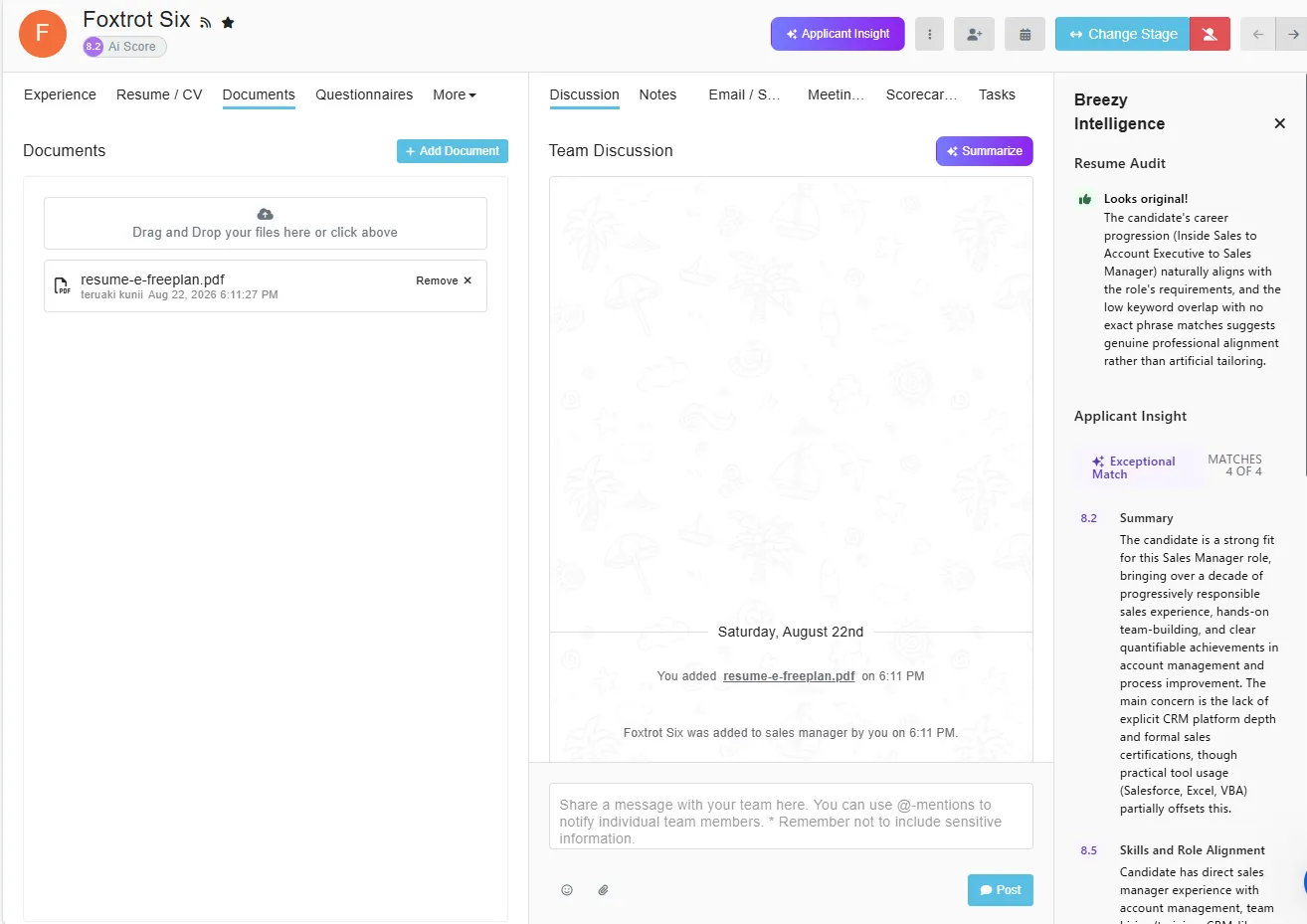
Breezy scored him. Immediately, with no prompt and no confirmation:
- an 8.2 AI Score badge on the candidate header
- Exceptional Match — matches 4 of 4 criteria
- five scored sections with written reasoning
- a completed Resume Audit
- no paywall, no upgrade modal, nothing asking whether I wanted this
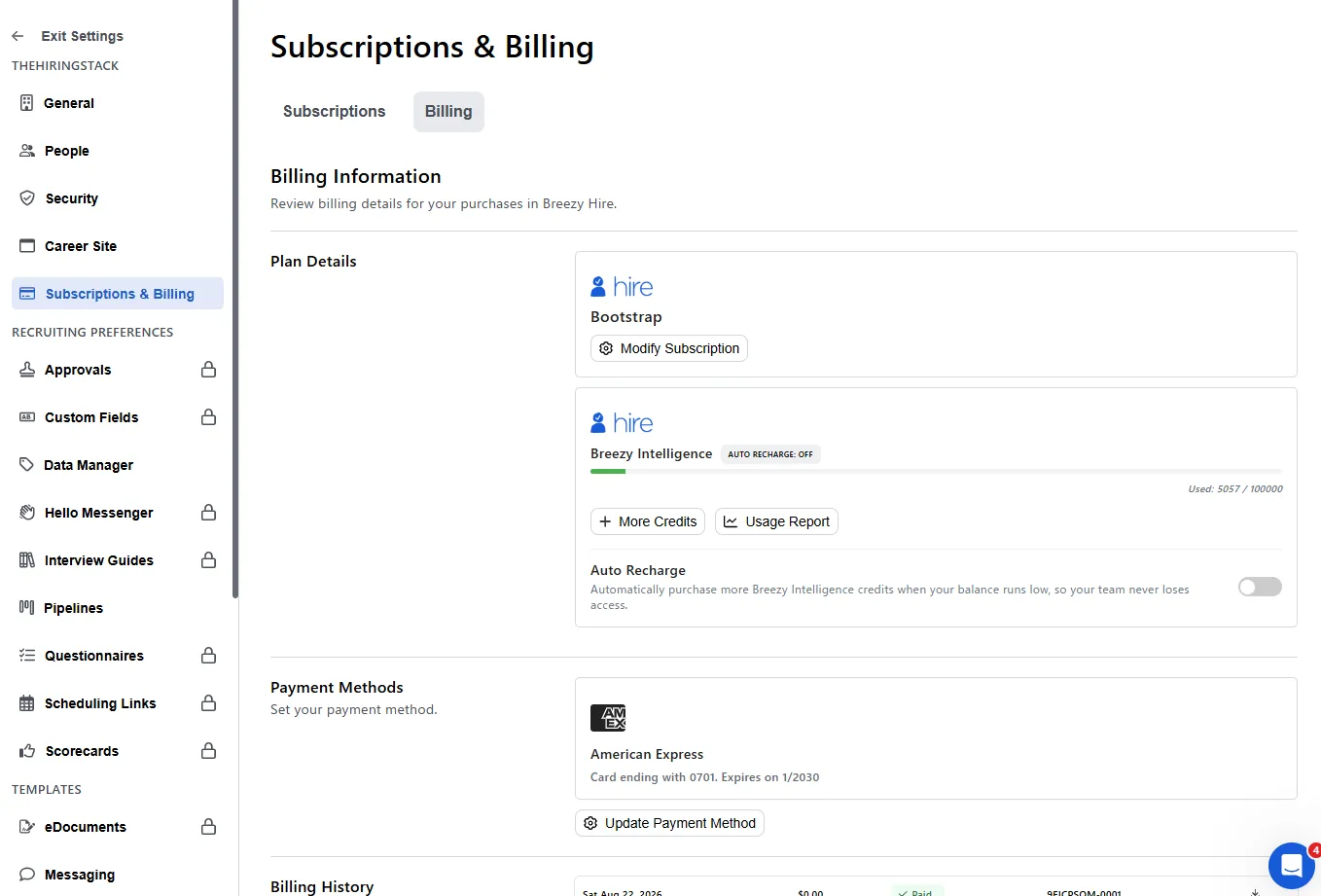
Then I reopened the billing page. Used: 5,057 / 100,000. A deduction of 766 credits
for one candidate, on a free plan, from an upload.
Breezy’s own log says a bot did it
Breezy will email you a usage report for any date range. I requested one for that day. It
came back with two rows and an Initiated By column:
| AI Service | Credits Used | Candidate | Initiated By | Timestamp |
|---|---|---|---|---|
| Applicant Insight | 395 | Foxtrot Six | Breezy Bot | 2026-08-22 09:11:42 UTC |
| Resume Audit | 371 | Foxtrot Six | Breezy Bot | 2026-08-22 09:11:34 UTC |
395 + 371 = 766, matching the balance change exactly. Both rows are attributed to Breezy Bot, not to me. This is not my characterisation of the behaviour; it is the vendor’s own accounting record of it.
The same pattern appears in the trial-period report: of twelve AI operations across eleven days, six are logged as Breezy Bot. The Resume Audit consistently fires eight seconds before the Applicant Insight, on upload, in that order.
The fair objection, and why it does not settle it
There is a reasonable defence available to Breezy here, and I want to state it properly rather than knock down a weak version.
Breezy Intelligence is sold as an add-on, not as a plan feature. It appears in the “Feature add-ons” list alongside SMS messaging, not in the four plan cards. Credits are bought separately and, per the purchase screen, never expire. Read that way, credits you already hold are simply yours, and it is coherent that they keep working after a downgrade. Arguably that is generous.
Two things stop that from settling the matter.
The first is consent. The charge is not attached to a button. I uploaded a document; the spend happened because a toggle was on, silently, from a plan I no longer had. Nothing at the moment of upload said that scoring would run or that it would cost anything. There is one setting elsewhere in the product — Move Based on Score — that will also change a candidate’s stage automatically from that same score, and it can be set as far as Hired. I had deliberately left it off. Had I left it on, this upload would have moved a candidate through my hiring pipeline on a free plan, unattended.
The second is that nowhere in the downgrade flow does anyone tell you the AI keeps running. You are not warned that the toggles stay live. You are not shown the balance. You find out by watching a number change.
One limit on my own claim, since it matters: the account still held trial credits. I have not tested what happens when the balance reaches zero — whether the AI stops silently, prompts, or charges the card now on file. I am not going to spend the remaining 95,000 credits to find out, and you should not assume the behaviour continues at zero.
What you actually lose
Three things, and only one of them is what the plan comparison table would lead you to expect.
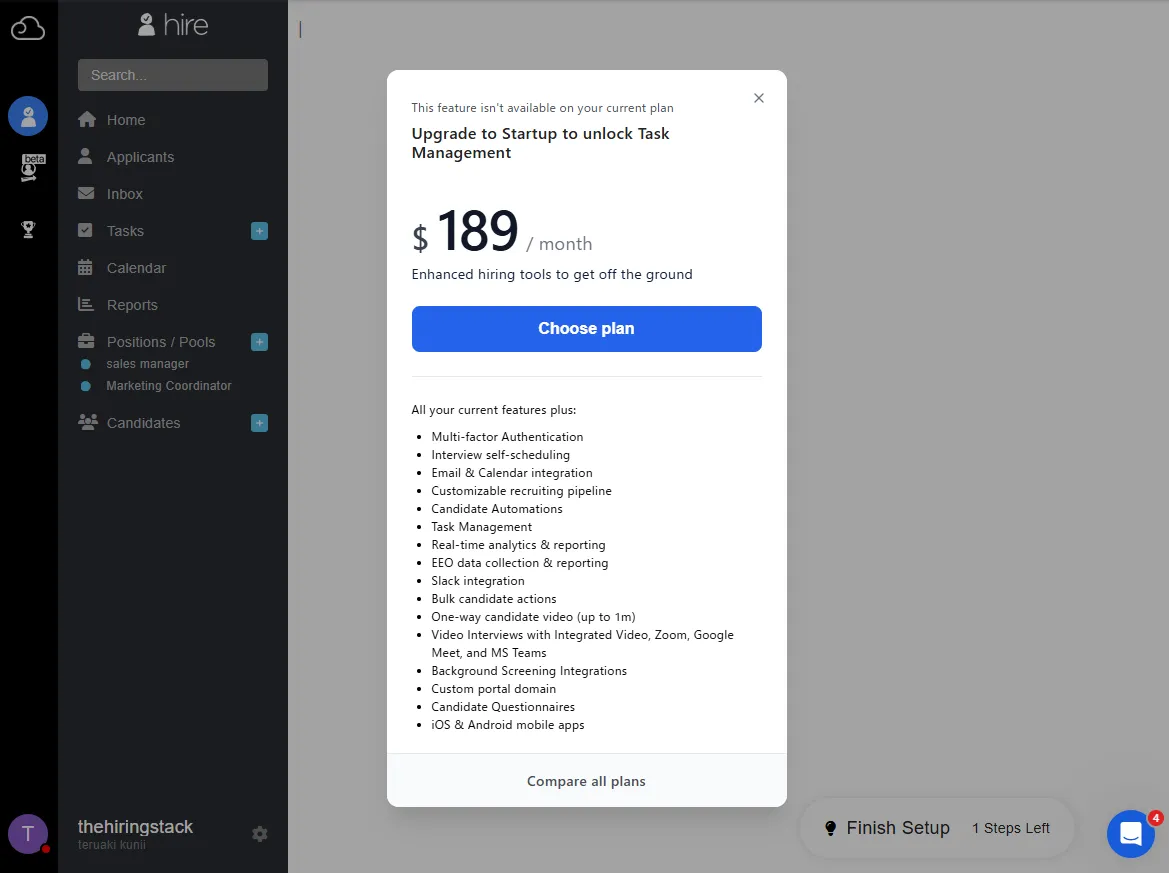
Automation stops. Tasks are gone behind a $189/month modal — a figure worth holding onto, because the plan page advertises the same tier at $157. What each tier costs on both billing bases is priced out in Breezy HR pricing: the monthly price is not on the page. Stage actions are disabled — though the pipeline editor still cheerfully reports “1 stage action enabled”, displaying a setting you can no longer see or change. Pipelines remain visible and remain attached to positions; you just cannot edit them.
The reminders, however, do not stop. The three test tasks I set during the trial are still
open, and Breezy still emails me about them: You have 3 overdue tasks, every day at
09:00 JST, on each of the 33 days from the downgrade on 25 August to 27 September. The
email’s Review Tasks button leads to the Tasks page, and on the free plan the Tasks page
is the same $189 prompt. I have not found a screen on this plan from which to close them.
Two things I built became unreadable. This is the part I would weigh most heavily. My two scorecards and my questionnaire were not deleted — Breezy is clear elsewhere that deletion is permanent, and this is not that. They are still in the account. But the management screens for both are replaced, wholesale, by an upgrade page.
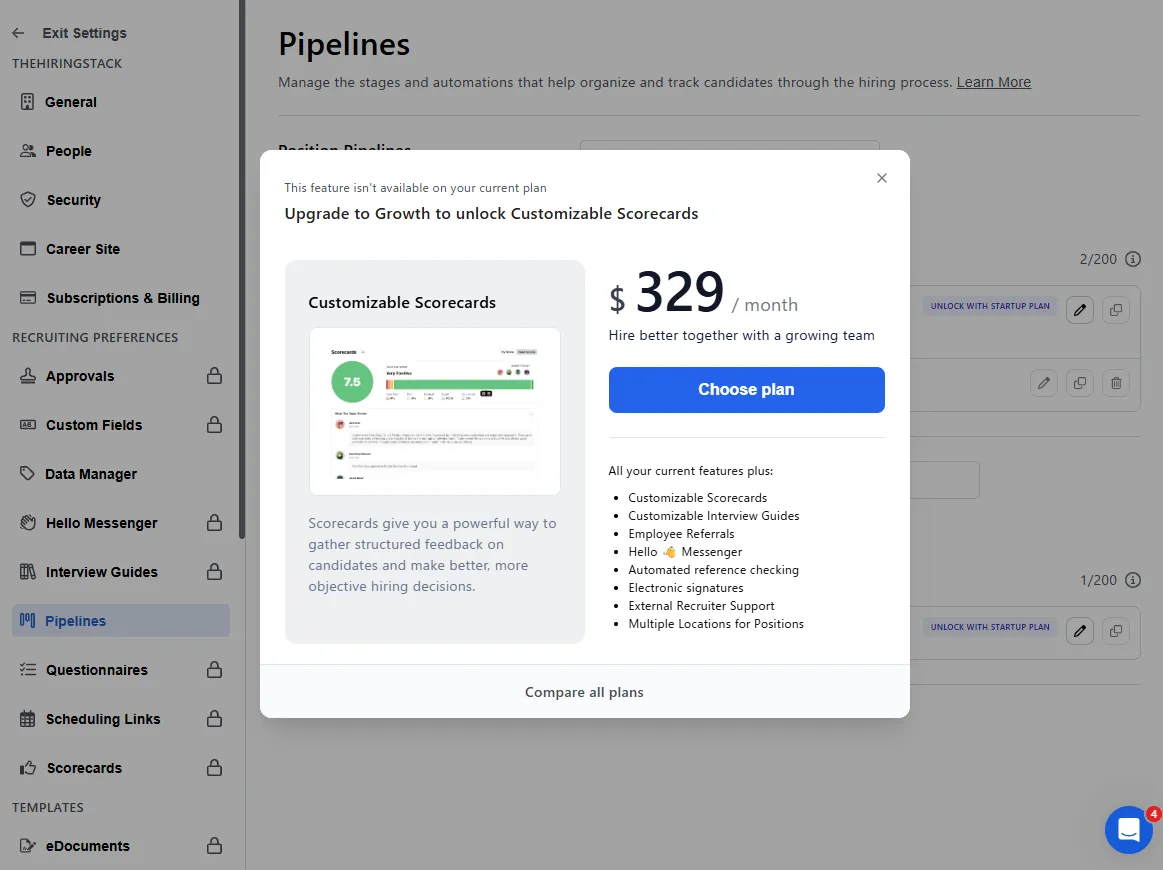
Structured interview criteria are exactly the kind of thing a small team writes once, carefully, and refers back to. On the free plan you cannot read yours. Not “cannot edit” — cannot read. If that content only exists inside Breezy, it is now behind $329 a month.
And there is a clock on your candidates. One line sits above the plan cards, outside any card, in small text:
Bootstrap tier includes full access to candidates from the past 30 days.
Every candidate in my account is younger than 30 days, so nothing has happened yet. The oldest were added on 11 August, which puts them at the boundary on 10 September. I cannot tell you from today’s screens what “full access” excludes, and I am not going to guess. Update, 19 September 2026: I watched the boundary pass, and the answer is stranger than deletion. But if you are downgrading an account with a year of hiring history in it, that sentence is the most important one on the page, and it is not in the comparison table.
The credits are cheap. That is the problem.
Throughout the trial the AI cost was displayed to me exactly one way: as a number of
credits. 401 credits. Used: 4,291 / 100,000. No currency appears anywhere in the
product’s AI screens.
You cannot convert that number, because the + More Credits button is disabled until a payment method is on file. I spent eleven days unable to answer “what does this cost?” — not because the information was hidden in fine print, but because the button that shows it required a card first.
Registering a card during the downgrade unlocked it. Here is the entire pricing screen:
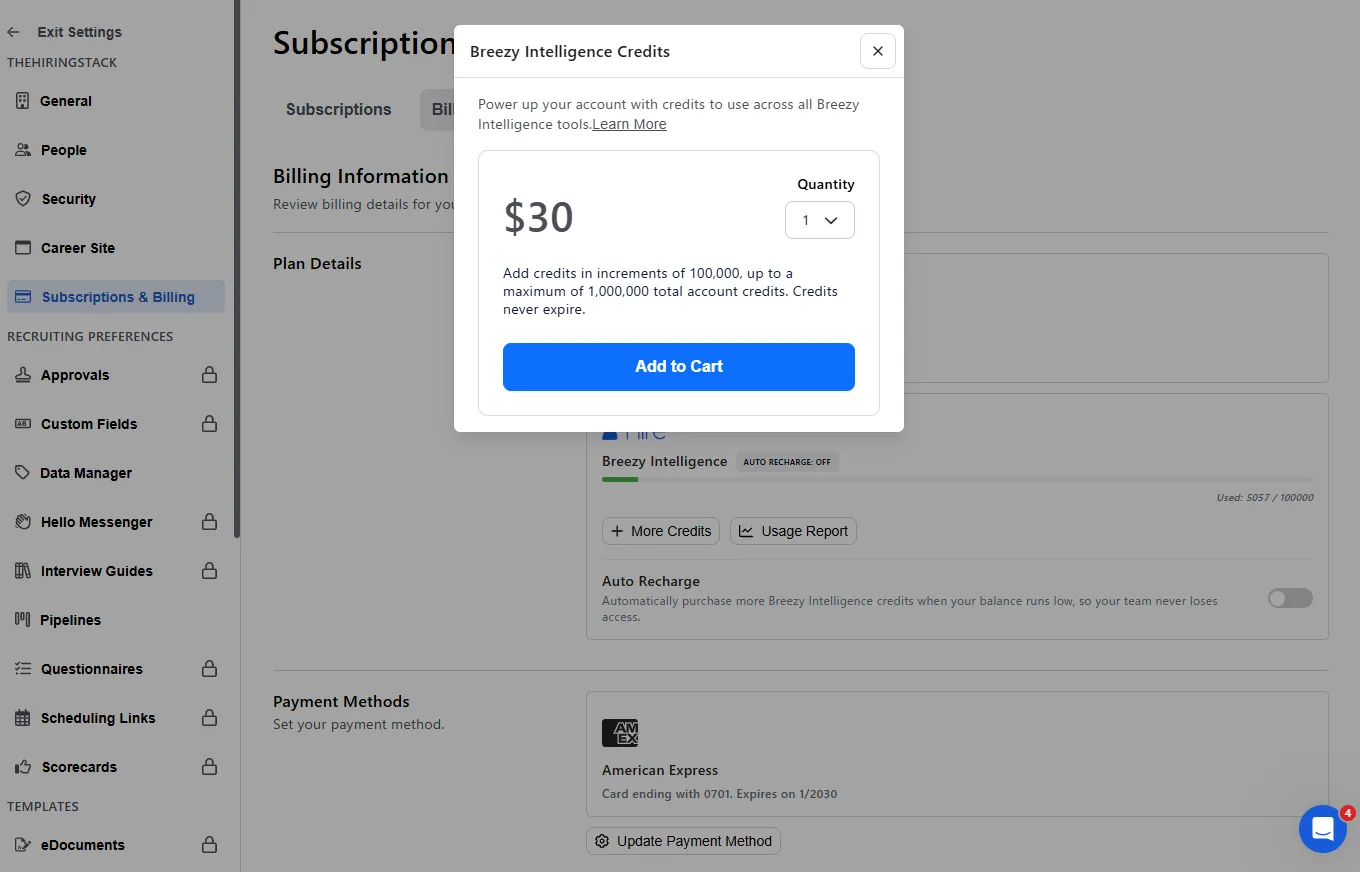
$30 — Quantity: 1
Add credits in increments of 100,000, up to a maximum of 1,000,000 total account credits. Credits never expire.
$30 per 100,000 credits. So:
| Credits | Cost | |
|---|---|---|
| One candidate, scored and audited | 766 | about $0.23 |
| Writing one job description with AI | 291–348 | about $0.10 |
| The entire trial allowance | 100,000 | $30 |
| Everything I spent in eleven days | 5,057 | about $1.52 |
AI screening on Breezy costs roughly twenty-three cents per candidate. That is cheap. I had spent two weeks building a mental case about opaque metered AI billing, and the meter turns out to read a quarter.
Which is the actual finding, so let me put it plainly: the price is not high, it is unknowable. A buyer evaluating Breezy sees a five-digit credit balance draining at 400 a click, with no unit, no currency, and no way to price it without handing over a card. The number is designed to be watched, and it cannot be converted. Twenty-three cents would be reassuring — if you were allowed to know it.
Two more details from that screen, since they never appear elsewhere: credits are sold only in 100,000 blocks, so the minimum top-up is $30; and the account ceiling is 1,000,000 credits, or $300 held at once.
One number that will not sit still
A footnote for anyone planning to budget from this. The per-operation cost is not fixed. Across thirteen logged operations:
- Applicant Insight: 363, 395, 397, 400, 401
- Resume Audit: 369, 370, 371, 372, 377
- Help Me Write (job description): 291, 348
I assume this tracks input length, but the product does not say so, and no estimate is shown before you trigger anything. Budget in ranges, not in unit prices — and note that writing a job description with the AI assistant spends credits too. Before I had run a single screening, 1,242 credits — 29% of everything I would eventually spend — had already gone on two job-description generations and two candidate activity summaries. Nothing on those screens indicates that pressing the button costs anything.
One more thing about the pricing pages
While comparing plan screens I noticed the same plan quoted at two prices.
The plan comparison page defaults to Billed Annually 15% Off, showing Startup at $157, Growth at $273, Business at $439. The upgrade modals that appear when you press a locked feature quote the monthly rate: Startup $189, Growth $329.
Both are honest, both are labelled if you look, and every SaaS company does this. It is worth knowing only because within a single session Breezy will show you the same plan at $157 and at $189, and the number that appears at the moment you most want the feature is the higher one.
If you are about to downgrade
Based on what the comparison came back with, in order:
- Export your candidates first, with every column switched on. Open the Columns menu and tick everything before you export, or you will get whatever subset your list happens to be displaying. Export worked on the free plan for me, but export it while you know it works.
- Copy your scorecards and questionnaires out by hand. Screenshot them, paste them into a document, anywhere outside Breezy. They stay in the account and you will not be able to read them.
- Turn off Applicant Insight and Resume Audit before you switch, unless you want scoring to continue. They stay on, they stay silent, and they keep spending.
- Check Move Based on Score specifically. If it is on, automatic scoring can move candidates through your pipeline on the free plan without you.
- Note your credit balance. It is the only way you will notice the AI running.
- Have a card ready. You cannot reach the $0 plan without one.
- If your account has candidates older than 30 days, export before you switch, not after — and open the file to check a name you recognise. I have since watched the 30-day clause take effect: nothing is deleted, but names and email addresses are replaced by random strings, and an export taken afterwards has the right row count and the wrong contents.
Which tool handles this better?
The two questions I would put to any competing product are narrower than “what does the free plan include”, and neither is answerable from a pricing page.
The first: when you downgrade, does anything tell you what you are about to lose? Breezy’s confirmation dialog is eleven words and a dollar sign.
The second: does metered AI spending require a human to authorise it, each time? Breezy’s own log answers no, and names the actor: Breezy Bot.
I am running the same test on Manatal and JazzHR next, with the same account contents and the same before-and-after screenshots. One difference is already visible from the outside, and it reframes the second question rather than answering it: Manatal has no free tier at all. It sells a 14-day trial and then stops. So there is no downgrade to compare — the question there becomes what a trial ending looks like when there is no showroom to be left standing in, and whether you can still get your candidates out on day fifteen. I have reported it: on Manatal, day fifteen is a payment page, and the answer is no.
Two other things I found in the same account, if you are evaluating Breezy specifically: its AI reports events that never happened, and importing a spreadsheet only carries four fields across — including, oddly, the one free-text field the importer accepts but the exporter cannot produce.
Tested on 22 August 2026 on a Breezy Hire account downgraded from trial to Bootstrap. Prices and screens are as at that date. The candidates named here are fictional test records I created.
Manatal has no free plan to fall back to when its trial ends. What that changes.
Disclosure: the Breezy HR link in this post pays me a commission if you sign up through it, and it is marked where it appears above. It costs you nothing extra, it did not change a word of what this post says, and I do not accept payment in exchange for favourable coverage. Every other link here is an ordinary one.